Skip to content
Andwin Circuits
  • Home
  • ProductsExpand
    • HDI multilayer PCB
    • Rigid Flex PCB
    • Flex pcb
    • Special PCBExpand
      • High Frequency PCBExpand
        • Rogers RO4350B PCB
        • Rogers RO4003 pcb
        • Rogers RO3003 PCB
        • Rogers 5880 PCB
        • DICLAD 527 PCB
        • Taconic TLX series
        • Taconic TLX-8 RF PCB
        • Taconic TLX-9 RF PCB
      • High speed pcbExpand
        • Megtron 6 High Speed PCB
        • TU-872 SLK Sp High Speed
      • High TG PCBExpand
        • SHENGYI SH260 PCB
        • ISOLA 370HR PCB
        • ISOLA IS410 PCB
        • ISOLA IS420 PCB
      • Heavy copper PCB
      • Copper coin pcb
      • Copper inlay PCB
    • Metal Core PCBExpand
      • Copper core pcb
      • Aluminum PCB
      • 2 Layers Aluminum PCB
      • Direct thermal MCPCB
      • 2 Layers Direct Thermal
    • Ceramic PCBExpand
      • DPC ceramic PCB
      • DBC ceramic PCB
      • Thick film Ceramic PCB
      • Al2O3 Alumina PCB
      • AIN ALN ceramic PCB
      • IGBT Ceramic PCB
  • ServiceExpand
    • PCB Assembly
    • Quick turn PCB assembly
    • PCBA conformal coating
  • IndustryExpand
    • Telecommunication
    • IoT and Wireless
    • Industrial Control
    • Thermal management
    • Power and Energy
    • IC test board
    • Automative
    • Medical
  • CapabilityExpand
    • Rigid PCB
    • Rigid flex PCB
    • Metal core PCB
    • PCB Assembly
  • TechnologyExpand
    • Blogs
    • Via in pad
    • PCB E-test
    • PCB stack up
    • MCPCB panelization
    • Controlled impedance PCB
  • AboutExpand
    • About us
    • Certification
    • Factory Tour
  • Contact
Andwin Circuits
Home / Printed Circuit Board (PCB) Debugging Steps: A Comprehensive Guide

Printed Circuit Board (PCB) Debugging Steps: A Comprehensive Guide

ByGrace May 19, 2025May 19, 2025

Introduction

Printed Circuit Boards (PCBs) are the backbone of modern electronics, found in everything from consumer gadgets to industrial machinery. However, even a well-designed PCB can encounter issues during prototyping or production. Debugging is a critical process to identify and resolve these problems, ensuring the board functions as intended.

This guide outlines a systematic approach to PCB debugging, covering visual inspection, power checks, signal verification, and functional testing. Following these steps can save time, reduce costs, and improve reliability in PCB development.

1. Visual Inspection

Before applying power, conduct a thorough visual inspection to identify obvious defects:

A. Component Placement & Soldering

  • Verify that all components are correctly placed according to the schematic.
  • Check for cold solder joints, bridges, or missing connections.
  • Inspect polarized components (e.g., capacitors, diodes) for correct orientation.

B. PCB Traces & Shorts

  • Examine traces for breaks, hairline cracks, or manufacturing defects.
  • Use a magnifying glass or microscope to detect tiny solder splashes causing shorts.
  • Ensure no unintended connections between adjacent traces.

C. Mechanical Integrity

  • Check for damaged connectors, bent pins, or loose mounting holes.
  • Verify that mechanical components (switches, buttons) are properly seated.

Tools Used:

  • Magnifying glass / Microscope
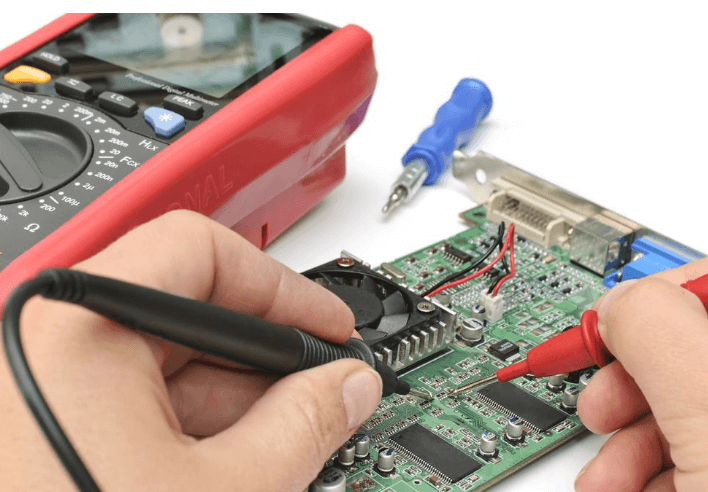
  • Multimeter (continuity mode)
Contact us for PCB quote now |

2. Power Supply Verification

A faulty power supply can lead to erratic behavior or component damage. Follow these steps:

A. Check Voltage Levels

  • Measure input voltage at the power connector.
  • Verify regulator outputs (e.g., 3.3V, 5V, 12V) match expected values.
  • Look for voltage drops under load (indicating poor power delivery).

B. Test for Shorts

  • Use a multimeter in resistance mode to check for shorts between power and ground.
  • If a short is detected, isolate sections of the PCB (e.g., remove ICs) to locate the fault.

C. Monitor Current Draw

  • Use a current-limited power supply to avoid damaging components.
  • Excessive current may indicate a short or defective component.

Tools Used:

  • Multimeter (voltage, resistance modes)
  • Bench power supply (with current limiting)
  • Oscilloscope (for ripple/noise analysis)

3. Signal Integrity & Functional Testing

After confirming power stability, proceed to test signal paths and functionality.

A. Clock & Reset Signals

  • Verify clock signals (e.g., crystal oscillators) with an oscilloscope.
  • Ensure reset circuits function correctly (e.g., voltage levels, timing).

B. Digital Communication Lines (I2C, SPI, UART)

  • Use a logic analyzer or oscilloscope to check signal integrity.
  • Look for noise, ringing, or incorrect voltage levels.
  • Verify data transmission between microcontrollers and peripherals.

C. Analog Circuit Testing

  • Check amplifier outputs, sensor readings, and filter responses.
  • Compare measured values against expected behavior.

Tools Used:

  • Oscilloscope
  • Logic analyzer
  • Signal generator (for analog stimulus)
Contact us for PCB quote now |

4. Firmware & Software Debugging

If the PCB includes a microcontroller or FPGA, firmware issues may cause malfunctions.

A. Verify Program Execution

  • Check if the MCU boots (e.g., LED blink test).
  • Use debugging tools (JTAG, SWD) to step through code.

B. Check Peripheral Initialization

  • Ensure GPIO, ADC, PWM, and communication interfaces are configured correctly.
  • Review datasheets for register settings.

C. Log Debug Data

  • Use UART or SWO (Serial Wire Output) for real-time debugging.
  • Monitor variables and system states.

Tools Used:

  • Debugger (ST-Link, J-Link, etc.)
  • Serial terminal (PuTTY, Tera Term)

5. Thermal & Environmental Testing

Some issues appear only under specific conditions.

A. Thermal Analysis

  • Run the PCB under load and monitor component temperatures.
  • Use a thermal camera to detect hotspots.

B. Vibration & Environmental Stress

  • Test in different environments (temperature, humidity).
  • Check for loose connections under mechanical stress.

Tools Used:

  • Thermal camera
  • Environmental chamber (if available)

6. Final Validation & Documentation

After resolving issues, perform a full system test:

  • Validate all functions against design specifications.
  • Document fixes for future reference.

Conclusion

PCB debugging requires a methodical approach, combining visual inspection, electrical testing, and firmware validation. By following these steps, engineers can efficiently identify and resolve issues, ensuring reliable PCB performance.

Contact us for PCB quote now |

Post Tags: #aluminum clad pcb#aluminum core pcb#aluminum pcb#assemble pcb#pcb debugging

Post navigation

Previous Previous
Types of Resistors in PCB Design
NextContinue
Quality Assurance in PCB Manufacturing: Ensuring Design Specifications are Met

Search

Search

Products

  • HDI Multilayer PCB
  • Rigid Flex PCB
  • Flex pcb
  • High Frequency PCB
  • High speed pcb
  • Heavy copper PCB
  • Metal Core PCB
  • Ceramic PCB

Address

Andwin Circuits Co.,Limited
Email: sales@andwinpcb.com
Tel: +86 755 2832 9394
Fax:+86 755 2992  6717
ADD:1-2F-1217,HouDeQun Industrial park,
NanTing RD NO.56,ShaJing,BaoAn,Shenzhen 518104,GuangDong,China

Products

  • HDI Multilayer PCB
  • Rigid Flex PCB
  • Flex pcb
  • High Frequency PCB
  • High speed pcb
  • Heavy copper PCB
  • Metal Core PCB
  • Ceramic PCB

Technology

  • Blogs
  • Via in pad
  • PCB E-test
  • PCB stack up
  • Metal core PCB panelization
  • Controlled impedance PCB

CERTIFICATION

Certification >>


Copyright© 2003 - 2026 Andwin | All Rights Reserved | Powered by Andwin

Scroll to top
  • Home
  • Products
    • HDI multilayer PCB
    • Rigid Flex PCB
    • Flex pcb
    • Special PCB
      • High Frequency PCB
        • Rogers RO4350B PCB
        • Rogers RO4003 pcb
        • Rogers RO3003 PCB
        • Rogers 5880 PCB
        • DICLAD 527 PCB
        • Taconic TLX series
        • Taconic TLX-8 RF PCB
        • Taconic TLX-9 RF PCB
      • High speed pcb
        • Megtron 6 High Speed PCB
        • TU-872 SLK Sp High Speed
      • High TG PCB
        • SHENGYI SH260 PCB
        • ISOLA 370HR PCB
        • ISOLA IS410 PCB
        • ISOLA IS420 PCB
      • Heavy copper PCB
      • Copper coin pcb
      • Copper inlay PCB
    • Metal Core PCB
      • Copper core pcb
      • Aluminum PCB
      • 2 Layers Aluminum PCB
      • Direct thermal MCPCB
      • 2 Layers Direct Thermal
    • Ceramic PCB
      • DPC ceramic PCB
      • DBC ceramic PCB
      • Thick film Ceramic PCB
      • Al2O3 Alumina PCB
      • AIN ALN ceramic PCB
      • IGBT Ceramic PCB
  • Service
    • PCB Assembly
    • Quick turn PCB assembly
    • PCBA conformal coating
  • Industry
    • Telecommunication
    • IoT and Wireless
    • Industrial Control
    • Thermal management
    • Power and Energy
    • IC test board
    • Automative
    • Medical
  • Capability
    • Rigid PCB
    • Rigid flex PCB
    • Metal core PCB
    • PCB Assembly
  • Technology
    • Blogs
    • Via in pad
    • PCB E-test
    • PCB stack up
    • MCPCB panelization
    • Controlled impedance PCB
  • About
    • About us
    • Certification
    • Factory Tour
  • Contact
Search