Skip to content
Andwin Circuits
  • Home
  • ProductsExpand
    • HDI multilayer PCB
    • Rigid Flex PCB
    • Flex pcb
    • Special PCBExpand
      • High Frequency PCBExpand
        • Rogers RO4350B PCB
        • Rogers RO4003 pcb
        • Rogers RO3003 PCB
        • Rogers 5880 PCB
        • DICLAD 527 PCB
        • Taconic TLX series
        • Taconic TLX-8 RF PCB
        • Taconic TLX-9 RF PCB
      • High speed pcbExpand
        • Megtron 6 High Speed PCB
        • TU-872 SLK Sp High Speed
      • High TG PCBExpand
        • SHENGYI SH260 PCB
        • ISOLA 370HR PCB
        • ISOLA IS410 PCB
        • ISOLA IS420 PCB
      • Heavy copper PCB
      • Copper coin pcb
      • Copper inlay PCB
    • Metal Core PCBExpand
      • Copper core pcb
      • Aluminum PCB
      • 2 Layers Aluminum PCB
      • Direct thermal MCPCB
      • 2 Layers Direct Thermal
    • Ceramic PCBExpand
      • DPC ceramic PCB
      • DBC ceramic PCB
      • Thick film Ceramic PCB
      • Al2O3 Alumina PCB
      • AIN ALN ceramic PCB
      • IGBT Ceramic PCB
  • ServiceExpand
    • PCB Assembly
    • Quick turn PCB assembly
    • PCBA conformal coating
  • IndustryExpand
    • Telecommunication
    • IoT and Wireless
    • Industrial Control
    • Thermal management
    • Power and Energy
    • IC test board
    • Automative
    • Medical
  • CapabilityExpand
    • Rigid PCB
    • Rigid flex PCB
    • Metal core PCB
    • PCB Assembly
  • TechnologyExpand
    • Blogs
    • Via in pad
    • PCB E-test
    • PCB stack up
    • MCPCB panelization
    • Controlled impedance PCB
  • AboutExpand
    • About us
    • Certification
    • Factory Tour
  • Contact
Andwin Circuits
Home / NetClass function of PCB software

NetClass function of PCB software

ByGrace July 22, 2025July 21, 2025

You should have read a lot of books and materials on PCB wiring software. There are many articles on wiring techniques on the Internet, most of which teach people how to avoid interference, how to run ground wires, etc. In fact, there is another function in these software, which is also very useful, but most books do not introduce it. This is the NetClass function.


When the PCB file is loaded into the network table for the first time, it is not classified. This function can manually classify countless network connections, such as power, data_bus, Address_bus, Hi_volta and other categories. After classification, different wiring strategies can be applied to different categories.
Okay, now let’s try this function (taking protel as an example):
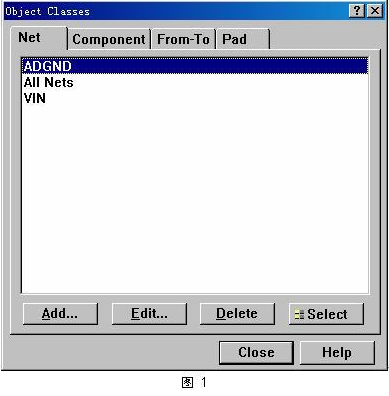
First open a PCB diagram; select the menu “Design–>Classes..” to jump out of the screen in Figure 1.
Here I have pre-defined several Cs, among which “AllNets” is the default category of protel, which includes all networks. If the wiring rules are defined, the default is for this category.


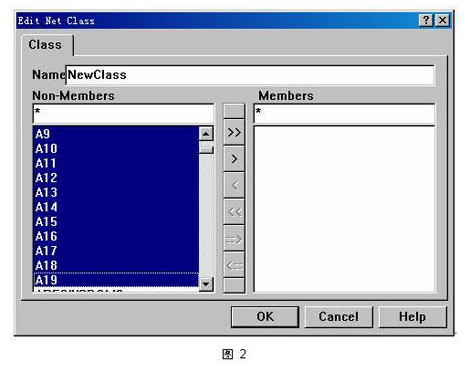
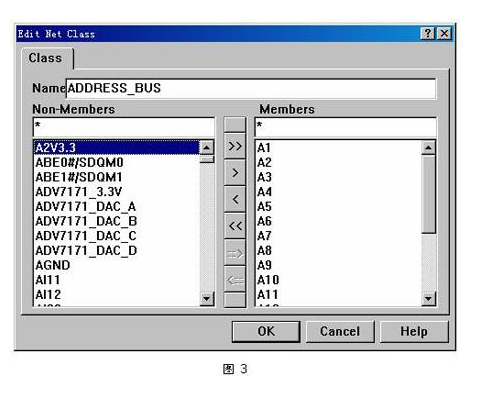
Now I want to add a category “Address_bus” to represent the CPU address bus for this PCB. Press the “Add” button in the screen of Figure 1, select “A0~A19” in the screen of Figure 2, and then select “>” to place these networks in the right subwindow. As shown in Figure 3. In this way, a new PCB network category is established. In the same way, create network categories such as “power” and “data_bus”.
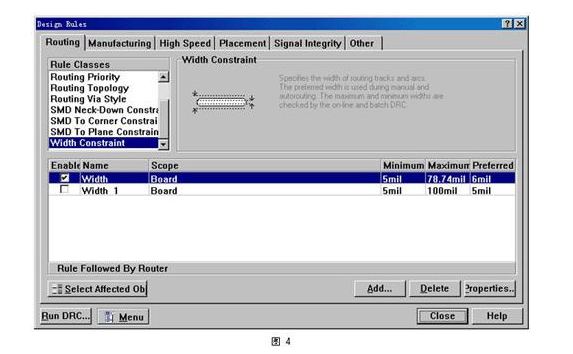
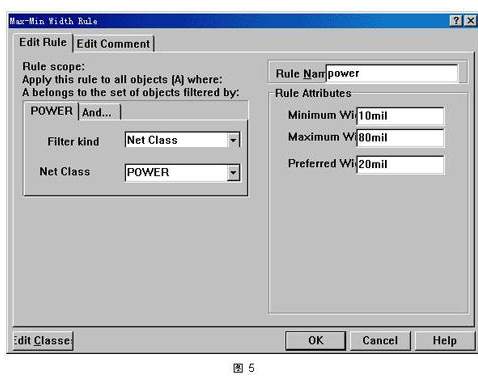
Okay, let’s specify the routing strategy for these network categories respectively. First, let’s specify the routing strategy for the power category. Press the “Add” button in the screen of Figure 4 to add a strategy. As shown in Figure 5, select “NetClass” for “FilterKind” and “POWER” for “NetClass”, and then you can set its line width and other parameters separately. You can also add a proximity restriction rule for the POWER class (since my circuit board is a 4-layer board, I will not set the proximity rule for this project).
Since my circuit board is a high-speed embedded system, the CPU external bus frequency is about 200MHz. Therefore, the design of the address bus and data bus becomes crucial. The length difference between each address bus cannot be too long, otherwise it will cause transmission delay. However, it is really troublesome to measure the length difference manually, so here you can set a wiring rule for the address bus.
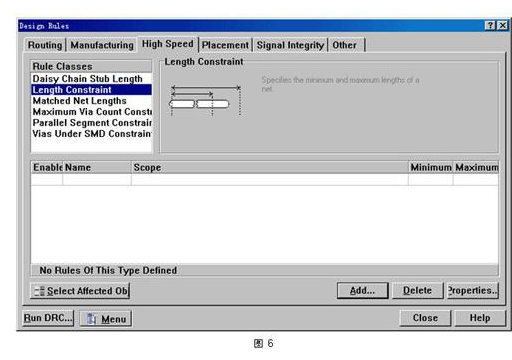
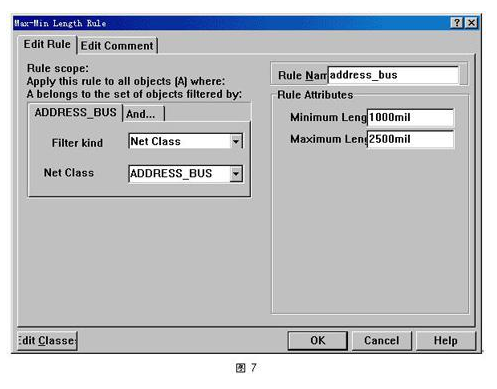
In the wiring rule window of Figure 6, select “LengthConstraint”, the window of Figure 7 pops up, select the “ADDRESS_BUS” class, and you can set the maximum and minimum length of the bus. The window shown in Figure 8 can set the serpentine wiring rule for this NetClass.
After setting the above rules, both manual and automatic wiring will be much simpler. In the process of manual wiring and trimming circuit boards, you don’t have to consider these parameters anymore, because the PCB editor will give a warning if you make a mistake. With this setting, you can set rules for a large number of signal lines at a time, and no longer need to set them one by one. It can save you a lot of time and avoid many low-level mistakes that you shouldn’t make.

Contact us for PCB quote now |
Post Tags: #aluminum clad pcb#aluminum core pcb#aluminum pcb#assemble pcb#pcb design#PCB layout#pcb software

Post navigation

Previous Previous
PCB Design, Manufacturing, and Processing: A Comprehensive Guide
NextContinue
The Impact of IoT Development on PCB Industry

Search

Search

Products

  • HDI Multilayer PCB
  • Rigid Flex PCB
  • Flex pcb
  • High Frequency PCB
  • High speed pcb
  • Heavy copper PCB
  • Metal Core PCB
  • Ceramic PCB

Address

Andwin Circuits Co.,Limited
Email: sales@andwinpcb.com
Tel: +86 755 2832 9394
Fax:+86 755 2992  6717
ADD:1-2F-1217,HouDeQun Industrial park,
NanTing RD NO.56,ShaJing,BaoAn,Shenzhen 518104,GuangDong,China

Products

  • HDI Multilayer PCB
  • Rigid Flex PCB
  • Flex pcb
  • High Frequency PCB
  • High speed pcb
  • Heavy copper PCB
  • Metal Core PCB
  • Ceramic PCB

Technology

  • Blogs
  • Via in pad
  • PCB E-test
  • PCB stack up
  • Metal core PCB panelization
  • Controlled impedance PCB

CERTIFICATION

Certification >>


Copyright© 2003 - 2026 Andwin | All Rights Reserved | Powered by Andwin

Scroll to top
  • Home
  • Products
    • HDI multilayer PCB
    • Rigid Flex PCB
    • Flex pcb
    • Special PCB
      • High Frequency PCB
        • Rogers RO4350B PCB
        • Rogers RO4003 pcb
        • Rogers RO3003 PCB
        • Rogers 5880 PCB
        • DICLAD 527 PCB
        • Taconic TLX series
        • Taconic TLX-8 RF PCB
        • Taconic TLX-9 RF PCB
      • High speed pcb
        • Megtron 6 High Speed PCB
        • TU-872 SLK Sp High Speed
      • High TG PCB
        • SHENGYI SH260 PCB
        • ISOLA 370HR PCB
        • ISOLA IS410 PCB
        • ISOLA IS420 PCB
      • Heavy copper PCB
      • Copper coin pcb
      • Copper inlay PCB
    • Metal Core PCB
      • Copper core pcb
      • Aluminum PCB
      • 2 Layers Aluminum PCB
      • Direct thermal MCPCB
      • 2 Layers Direct Thermal
    • Ceramic PCB
      • DPC ceramic PCB
      • DBC ceramic PCB
      • Thick film Ceramic PCB
      • Al2O3 Alumina PCB
      • AIN ALN ceramic PCB
      • IGBT Ceramic PCB
  • Service
    • PCB Assembly
    • Quick turn PCB assembly
    • PCBA conformal coating
  • Industry
    • Telecommunication
    • IoT and Wireless
    • Industrial Control
    • Thermal management
    • Power and Energy
    • IC test board
    • Automative
    • Medical
  • Capability
    • Rigid PCB
    • Rigid flex PCB
    • Metal core PCB
    • PCB Assembly
  • Technology
    • Blogs
    • Via in pad
    • PCB E-test
    • PCB stack up
    • MCPCB panelization
    • Controlled impedance PCB
  • About
    • About us
    • Certification
    • Factory Tour
  • Contact
Search