
Methods for Exporting Coordinate Date from PCB software
Exporting coordinate date using the PCB design software’s own functions is the most common method for exporting coordinate data.Most factories use this method to obtain component coordinate data.Most factories use this method to obtain component coordinate date.Then steps can be roughly divided into three:switching units,setting the coordinate origin,and exporting coordinates.The following describes methods for exporting coordinate data from some common PCB design software.
1.PADS
PADS is an excellent circuit board design software developed by mentor for mid-range and low-end users.The latest version is 2007.The latest version is 2007.The steps for exporting coordinate files from PADS are as follows:
(1)Open the PCB file in PADS.
(2)Switch to metric units.Select”Setup → Preference” from the menu bar. In the “Design Unit” column on the Global tab, select “Metric” to switch to metric units.
Set the coordinate origin. Select “Setup → Set Origin” from the menu bar. Use the mouse to select an appropriate location on the PCB and set it as the new coordinate origin.
Export the coordinate data. Select “File → CAM” from the menu bar. In the Side column, select the top or bottom PCB layer. In the Parts column, select SMT. In the Output column, select the output format for the placement machine (Dynapert Promann). Then click “Run.” In the dialog box that pops up, prompting you for the file save path, click OK to export the coordinate data.
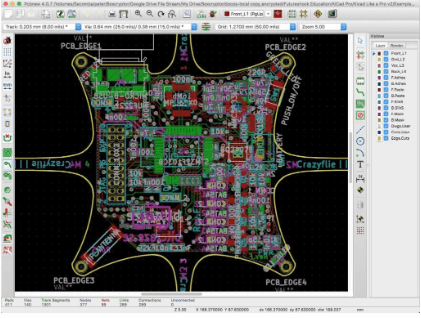
Protel
Protel software was one of the earliest PCB design software to enter the Chinese board-level design market. This article uses Protel 99 as an example to explain how to export coordinate files. The steps are as follows:
Open the PCB file in Protel 99.
Set the origin. Select “Edit → Origin → Set” from the menu bar to set the coordinate origin.
Export the coordinate data. Select “File → CAM Manager…” from the menu bar. The Output Data Wizard interface will appear. Click “Next.”
Select the output data type as Pick Place, and then click “Next” again to continue. Select Text for the file format and Metric for the units. Then select “Tools → Preference…” from the menu. In the CAM Options dialog box that pops up, set the directory for the output coordinate file. Select “Tools → Generate CAM Files” from the menu to generate the coordinate file in the specified path.
Allegro
Allegro is PCB design software produced by Cadence for mid- to high-end enterprise users. It is primarily designed for high-speed, high-density circuit board design and is particularly widely used in fields such as communications. The latest version is 16.0. To export coordinate data from Allegro:
Open the PCB design file in Allegro.
Set the origin and switch to metric units. Select “Setup → Drawing Size…” from the menu. Select millimeter for User Units. In the MOVE ORIGIN field, enter the coordinate data for the new origin relative to the current origin, and press “OK.”
3) Export the coordinate file. Select “File → Export → Placement…” from the menu. Select Body Center for Placement Origin. Press the “Export” button to export the coordinate data. 4. Orcad
Orcad is Cadence’s PCB design software for the mid-to-low-end market. It’s currently integrated into the latest version of Cadence Allegro. To export coordinate data from Orcad:
Open the PCB design file in Orcad.
Set the origin. Select “Tool → Dimension → Move Datum” from the menu bar and use your mouse to select an appropriate location on the PCB as the new coordinate origin.
Export the coordinate data. Select “Auto → Create Reports…” from the menu bar, select the output items, and press OK. The coordinate data file will be generated in the PCB directory.
Mentor Expedition
Mentor Expedition is another PCB design software from Mentor. To export coordinate data from Mentor Expedition:
Open the PCB design file in Mentor Expedition.
Switch the units. Select “Setup → Setup Parameters…” from the menu bar and select millimeters in the dialog box that pops up.
Set the origin. Select “Edit → Place → Origin…” from the menu. In the dialog box that pops up, select “Board” for Type. In the Location field, enter the coordinate data for the new origin relative to the current origin.
Export coordinate data. Select “File → Export → General Interface…” from the menu. Select “Generic AIS” in the dialog box that pops up. Press OK to generate a coordinate file in the PCBOUTPUT directory within the current PCB file.
Cadstar
Cadstar is PCB design software developed by Zuken, Japan, for mid-range and low-end users. The latest version is 9.0. The steps for exporting coordinate data are as follows:
Open the PCB design file in Cadstar.
Switch units. Select “Settings → Units…” from the menu. In the dialog box that pops up, select Millimeters.
Set the coordinate origin. Select “Settings → Design Origin…” from the menu. Select the “Origin Position Relative to Current Origin” checkbox. Enter the coordinate data for the new origin relative to the current origin in the X and Y coordinate fields. 4. Export coordinate data. Select “Tools → Report Generate → Manager Reports…” from the menu, click Open, select the file type comp_SMD.rgf, and then press Run to generate the coordinate file.
VII. CR-5000
CR-5000 is another PCB design software developed by Zuken, Japan. The steps for exporting coordinate data are as follows:
CR-5000 is another PCB design software developed by Zuken, Japan. The steps for exporting coordinate data are as follows:
Export the coordinate file. In the DOS window, enter the directory where you place the PCB file, and then execute the following command: >camlist -m comp “name”.pcb -o “name”.txt. A “name”.txt file will be generated in the directory where you place the PCB file. This file contains the coordinates of each component.
Open the PCB design file in CR-5000.
Set the coordinate origin. Select “Environment → Move Origin” from the menu. The “Move Origin” pane will appear on the right side of the interface. Move the cursor to the preset new PCB origin location. Press the left mouse button to automatically enter the coordinate data of the new origin relative to the current origin in the X and Y coordinate columns. Press the “Move Origin” button to complete the origin setting.