
Protel PCB: A Comprehensive Guide to Design and Implementation
Introduction
Printed Circuit Board (PCB) design is a crucial aspect of modern electronics, enabling the integration of complex circuits into compact and efficient layouts. Among the various PCB design tools available, Protel PCB (now known as Altium Designer) has been a pioneering software in the electronics industry. Protel PCB was widely used for schematic capture, PCB layout, and design automation before evolving into the more advanced Altium Designer suite.
This article explores the fundamentals of Protel PCB, its key features, workflow, advantages, and its transition into modern PCB design tools. By understanding Protel’s legacy, engineers and designers can appreciate how PCB design tools have evolved over time.
1. Overview of Protel PCB
Protel PCB was one of the first widely adopted PCB design software packages, introduced by Protel International Pty Ltd (later acquired by Altium Limited). It provided an intuitive interface for designing schematics and converting them into manufacturable PCB layouts.
Key Features of Protel PCB
- Schematic Capture: Allows designers to create circuit diagrams with ease.
- PCB Layout Design: Supports single-sided, double-sided, and multi-layer PCB designs.
- Component Libraries: Includes an extensive library of electronic components.
- Design Rule Checking (DRC): Ensures that PCB layouts meet manufacturing constraints.
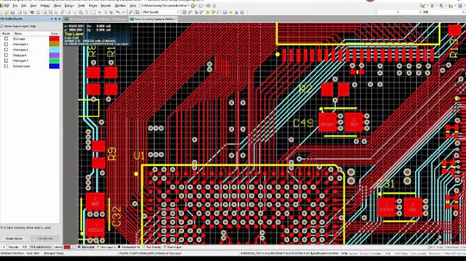
- Auto-routing and Manual Routing: Facilitates efficient trace routing.
- Gerber File Generation: Exports industry-standard files for PCB fabrication.
- Simulation Tools: Basic signal integrity and electrical rule checks.
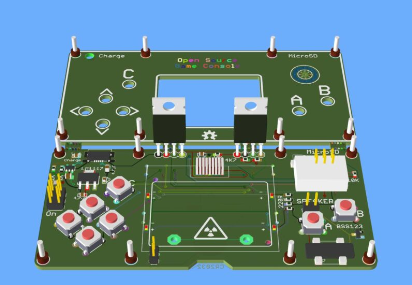
Protel PCB was particularly popular in the 1990s and early 2000s before being replaced by Altium Designer, which introduced more advanced features like 3D PCB visualization and high-speed design capabilities.
2. Protel PCB Design Workflow
Designing a PCB using Protel involves several structured steps:
Step 1: Schematic Design
- Create a schematic diagram using Protel’s schematic editor.
- Place components (resistors, capacitors, ICs) and connect them using wires or nets.
- Assign footprints to components (e.g., SMD or through-hole).
Step 2: PCB Layout
- Transfer the schematic to the PCB editor (using a netlist).
- Arrange components on the board for optimal placement.
- Define board dimensions and layer stack-up (single-layer, double-layer, or multi-layer).
Step 3: Routing
- Manual Routing: Designers manually draw traces between components.
- Auto-routing: Protel offers an auto-router to automatically connect traces based on design rules.
- Ensure proper trace width, spacing, and impedance control (for high-speed designs).
Step 4: Design Rule Check (DRC)
- Run DRC to detect errors like short circuits, unrouted nets, or incorrect clearances.
- Adjust the design based on DRC feedback.
Step 5: Gerber File Generation
- Generate Gerber files (RS-274X format) for manufacturing.
- Export drill files and assembly drawings.
Step 6: Prototyping and Testing
- Send Gerber files to a PCB manufacturer.
- Assemble and test the prototype for functionality.
3. Advantages of Protel PCB
Protel PCB was widely appreciated for several reasons:
User-Friendly Interface
- Intuitive schematic and PCB layout tools made it accessible for beginners.
Comprehensive Component Libraries
- Preloaded with common electronic components, reducing manual symbol creation.
Cost-Effective Solution
- More affordable than high-end tools like Cadence or Mentor Graphics, making it ideal for small businesses and hobbyists.
Industry-Standard Outputs
- Supported Gerber files, ensuring compatibility with PCB manufacturers.
Active Community Support
- A large user base provided forums, tutorials, and third-party libraries.
4. Limitations of Protel PCB
Despite its advantages, Protel had some limitations:
Limited High-Speed Design Features
- Lacked advanced signal integrity analysis and high-frequency design tools.
Basic Simulation Capabilities
- Did not support complex SPICE simulations like modern tools.
Transition to Altium Designer
- Protel was eventually phased out in favor of Altium Designer, which introduced 3D modeling, advanced routing, and better integration with mechanical CAD tools.
5. Protel PCB vs. Modern PCB Design Tools
While Protel was revolutionary in its time, modern PCB design tools like Altium Designer, KiCad, Eagle, and OrCAD offer enhanced functionalities:
| Feature | Protel PCB | Modern Tools (e.g., Altium Designer) |
|---|---|---|
| Schematic Capture | Basic | Advanced with hierarchical designs |
| PCB Layers | Up to 16 layers | Supports 32+ layers |
| 3D Visualization | No | Yes (Real-time 3D modeling) |
| High-Speed Design | Limited | Advanced signal integrity analysis |
| Auto-routing | Basic | AI-powered routing algorithms |
| Simulation | Minimal | Integrated SPICE and thermal analysis |
| Cloud Collaboration | No | Yes (Altium 365, Fusion 360) |
Modern tools also support flexible PCBs, RF design, and multi-board systems, which were not feasible in Protel.
6. Transition from Protel to Altium Designer
Altium Limited rebranded Protel PCB as Altium Designer in the early 2000s, introducing significant upgrades:
- Unified Design Environment: Combined schematic, PCB, and simulation in one platform.
- 3D PCB Visualization: Enabled mechanical integration with enclosures.
- Advanced Routing: Interactive length tuning and differential pair routing.
- Version Control & Collaboration: Cloud-based project management.
Many Protel users migrated to Altium Designer, benefiting from its enhanced capabilities while retaining familiarity with the workflow.
7. Learning Protel PCB in Today’s Context
Although Protel is outdated, understanding its principles helps in learning modern PCB design:
Legacy Knowledge Transfer
- Many older designs still use Protel files (.DDB format).
- Engineers maintaining legacy systems may encounter Protel-based designs.
Foundational Concepts
- Learning Protel’s schematic and layout principles eases the transition to modern tools.
Alternative Open-Source Tools
- KiCad: A free alternative with similar workflow but modern features.
- Eagle: Now part of Autodesk, offering cloud-based PCB design.
8. Conclusion
Protel PCB played a pivotal role in the evolution of PCB design software, offering an accessible and efficient platform for engineers and hobbyists. While it has been succeeded by more advanced tools like Altium Designer, its legacy remains influential in the electronics industry.
For modern designers, transitioning from Protel to contemporary tools ensures access to cutting-edge features like 3D modeling, high-speed design, and cloud collaboration. However, understanding Protel’s fundamentals provides a strong foundation for mastering PCB design.
As technology advances, PCB design tools will continue evolving, but the core principles established by Protel will always remain relevant in electronics engineering.