
What You Can Do with PCB Cooling Tips
Surface mount IC packages rely on printed circuit boards (PCBs) to dissipate heat. In general, PCBs are the primary cooling method for high power semiconductor devices. A good PCB thermal design can make a huge difference, either allowing the system to operate well or creating a potential thermal failure. Careful handling of PCB layout, board construction, and device mounting can help improve thermal performance in medium and high power applications.
Introduction
Semiconductor manufacturing companies have little control over the systems in which their devices are used. However, the system in which the IC is installed is critical to overall device performance. For custom IC devices, system designers often work closely with the manufacturer to ensure that the system meets the many thermal requirements of high power devices. This early collaboration ensures that the IC meets electrical and performance standards while operating properly within the customer’s thermal system. Many large semiconductor companies sell devices as standard parts, with no contact between the manufacturer and the end application. In this case, we can only use some general guidelines to help achieve a good IC and system passive cooling solution.
Common semiconductor package types are exposed pad or PowerPADTM type packages. In these packages, the die is mounted on a metal sheet called a die pad. This die pad supports the die during processing and also serves as a good thermal path for the device to dissipate heat. When the exposed pad of the package is soldered to the PCB, heat can quickly dissipate from the package and into the PCB. The heat is then dissipated through the PCB layers and into the surrounding air. An exposed pad package can typically conduct about 80% of the heat, which enters the PCB through the bottom of the package. The remaining 20% of the heat is dissipated through the device leads and the various sides of the package. Less than 1% of the heat is dissipated through the top of the package. For these exposed pad packages, good PCB thermal design is essential to ensure a certain device performance.
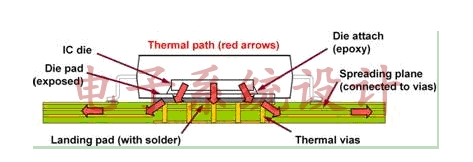
Figure 1 PowerPAD design
The first aspect of PCB design that can improve thermal performance is PCB device layout. Whenever possible, high-power components on the PCB should be separated from each other. This physical spacing between high-power components maximizes the PCB area around each high-power component, which helps achieve better heat conduction. Care should be taken to isolate temperature-sensitive components on the PCB from high-power components. Whenever possible, high-power components should be mounted away from PCB corners. A more central PCB location maximizes the board area around high-power components, which helps dissipate heat. Figure 2 shows two identical semiconductor devices: components A and B. Component A, located at the corner of the PCB, has a 5% higher chip junction temperature than component B, because component B is located more centrally. The corner location of component A limits heat dissipation because there is less board area around the components to dissipate heat.
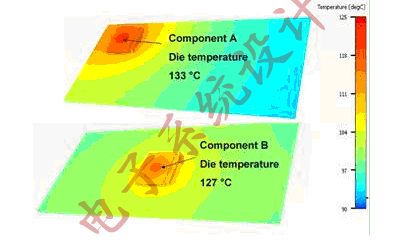
Figure 2 Effects of component layout on thermal performance. Components in the corners of the PCB have higher chip temperatures than components in the middle.
The second area that has the most decisive influence on the thermal performance of a PCB design is the structure of the PCB. As a general rule: the more copper a PCB has, the better the thermal performance of the system components will be. The ideal heat sink for semiconductor devices is to mount the die on a large block of liquid-cooled copper. This mounting method is impractical for most applications, so other changes to the PCB are required to improve heat dissipation. For most applications today, the shrinking overall system size has a negative impact on heat dissipation. Larger PCBs have more area available for heat transfer and more flexibility to leave enough space between high-power components.
Whenever possible, maximize the number and thickness of PCB copper ground planes. Ground plane copper is generally heavier and is an excellent thermal path for heat dissipation throughout the PCB. Routing the layers also increases the total weight of copper available for heat transfer. However, this routing is usually done with electrical and thermal isolation, limiting its role as a potential heat sink. Routing the device ground plane to be as electrically similar as possible to many ground planes can help maximize thermal transfer. Thermal vias on the PCB below the semiconductor device help heat enter the buried layers of the PCB and conduct it to the back of the board.
The top and bottom layers of the PCB are prime locations for heat dissipation. Using wider wires and routing away from high-power devices can provide a thermal path for heat dissipation. A dedicated heat spreader is an excellent way to dissipate heat from a PCB. The heat spreader is typically located on the top or back of the PCB and is thermally connected to the device through direct copper connections or thermal vias. In the case of an inline package (a package with leads on only two sides), this heat spreader can be located on the top of the PCB and shaped like a “dog bone” (narrow in the middle as the package, with a larger copper area away from the package, smaller in the middle and larger at both ends). In the case of a quad package (with leads on all four sides), the heat spreader must be located on the back of the PCB or inside the PCB.

Figure 3 Example of the “dog bone” method for a dual in-line package
Increasing the size of the heat spreader is an excellent way to improve the thermal performance of a PowerPAD package. Different heat spreader sizes have a significant impact on thermal performance. The product data sheet, which is provided in a table format, generally lists these dimensions. However, it is difficult to quantify the impact of the added copper in a custom PCB. Some online calculators allow the user to select a device and then vary the size of the copper pad to estimate the impact on the thermal performance of a non-JEDEC PCB. These calculation tools highlight the extent to which PCB design can affect thermal performance. For quad packages, the top pad area is just smaller than the exposed pad area of the device, in which case buried or backside layers are the first choice for better cooling. For dual in-line packages, a “dog bone” pad pattern can be used to dissipate heat.
Finally, systems with larger PCBs can also be used for cooling. Some of the screws used to mount the PCB can also be an effective thermal path to the base of the system, with the screws connecting to the thermal pad and ground plane. The number of screws should be maximized to reach the point of diminishing returns, considering the thermal effect and cost. Metal PCB stiffeners have more cooling area after connecting to the thermal pad. For some applications where the PCB is covered by an enclosure, profiled solder fill material has higher thermal performance than an air-cooled enclosure. Cooling solutions such as fans and heat sinks are also common methods of cooling the system, but they usually require more space or require design modifications to optimize the cooling effect.
To design a system with high thermal performance, it is far from enough to just choose a good IC device and a closed solution. The thermal performance scheduling of the IC depends on the PCB and the ability of the heat dissipation system to cool the IC device quickly. Using the above passive cooling methods, the thermal performance of the system can be greatly improved.