Specific steps for PCB surface treatment
I.PCB surface treatment:
After drilling, there will be residual copper foil burrs attached to the surface of the through hole on the PCB surface. At this time, the surface of the board will feel rough when touched by hand. These burrs will affect the quality of electroplating, so they must be removed. The steps for PCB surface treatment are as follows:
- Use 400-grit fine sandpaper or steel wool to fully brush the PCB surface back and forth until the PCB surface is smooth.
- Place the PCB under the light source to check whether there is a blocked hole. If so, use compressed air to spray out the debris in the hole to prevent the hole from being blocked and not conducting after electroplating. (If there is no compressed air, a drill bit slightly smaller than the hole diameter can be used to remove the debris)
II.Silver glue through hole:
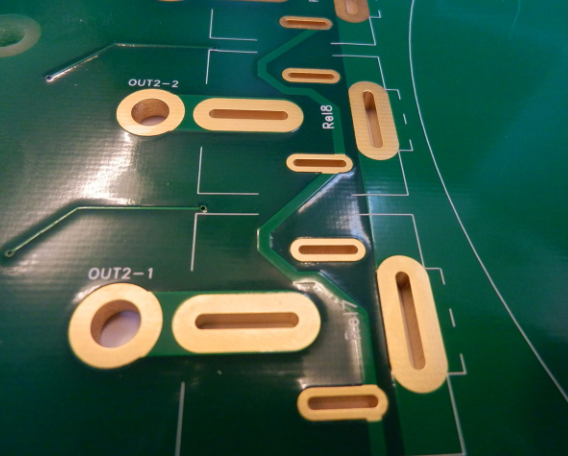
Since the hole wall after drilling the substrate is not conductive, it cannot be directly electroplated. Therefore, it is necessary to first perform the step of filling the through hole with silver glue so that the silver glue adheres to the hole wall for electroplating in the through hole. The steps for filling the through-hole with silver glue are as follows:
- Since silver glue will precipitate after being left to stand, it needs to be shaken evenly before use to facilitate the next step.
- Hold the PCB at about 30 degrees to the table, and use a scraper (long strip of about 10cm×5cm, which can be cut from the substrate edge material) to dip the silver glue and move it back and forth on the hole area of the board surface to scrape the silver glue into the hole. After completing one side, proceed to the other side.
*The method to confirm whether the silver glue has been scraped into the hole is as follows:
(1) When a layer of silver glue film can be seen in the hole after the scraper passes through the hole, it means that the silver glue has been filled into the hole.
(2) When the entire board surface is through-hole, turn the PCB over to check whether all the holes have silver glue overflowing from the edge of the hole. If so, continue the through-hole operation on the other side. The operation method is the same as above.
- Use compressed air to blow out the silver glue stuck in the hole, leaving only an appropriate amount of silver glue attached to the hole wall. (Note that the air pressure should not be too high to avoid blowing out all the silver glue; if there is no compressed air equipment, you can use a vacuum cleaner to suck out the silver glue to achieve the same effect).
- Use a clean rag to remove the excess silver glue on the board surface. Try to wipe the excess silver glue clean to avoid the silver glue hardening after the following drying step. It takes more time to remove.
*If there is no rag and toilet paper or similar materials are used, it is necessary to make sure that the peeled fibers do not block the holes. If there are, you can use a thin wire to remove them.
- Check whether there is silver glue on the walls of each hole, and there is no excess silver glue blocking the holes. If a hole is found to be blocked by silver glue, use a thin wire to remove it.
*When checking whether there is silver glue on the hole wall, you can place the PCB in a bright place and tilt the board slightly, so that you can see the condition of the hole wall. If there is silver glue adsorbed, you can see the reflection of the hole wall.
- Put the PCB in the oven and bake at 110℃ for 15 minutes. The purpose of baking is to make the silver glue harden and adhere to the hole wall. A general household oven can be used. This step involves the adhesion of the copper in the hole, which is very important. After the end, take the PCB out of the oven and let it cool at room temperature.
- Use 400-grit fine sandpaper or steel wool to scrub the PCB surface back and forth to remove the hardened silver glue on the PCB surface until the PCB surface is smooth. The baked PCB is brown. Use fine sandpaper or steel wool to remove the hardened conductive ink on the PCB surface. The PCB surface after removal should have the metallic luster of copper; if the silver glue on the board surface is not removed cleanly, the adhesion of the electroplated copper on the surface after electroplating is poor, and the copper surface may peel off or the surface may be uneven, so special attention should be paid.
III. PCB electroplating:
- Immerse the PCB in a sink or flush it directly with water to allow the hole wall to be fully moistened. After wetting, pay attention to the fact that there should be no bubbles in the hole wall. If there are bubbles, flush them again to remove them.
- Place the PCB in the electroplating tank, hold the PCB and swing it back and forth in the tank (about 10 times) to completely wet the hole wall with the electroplating solution.
- Use a dovetail clip to fix it in the center of the tank. For example, the electroplating current of A4-sized PCB is 3.5A and the electroplating time is 60 minutes.
*In order to obtain better electroplating quality, it is best to place the board in the center of the electroplating tank, and the alligator clip (black) of the cathode is clamped in the center of the horizontal bar. In this way, the concentration of the electroplating solution and the electroplating current can be evenly distributed to all parts of the PCB, and better electroplating quality can be obtained.
- It is recommended to set the current according to the size of the PCB.
- After the electroplating is completed, take out the PCB, rinse it with clean water and blow it dry to prevent oxidation of the PCB surface.
- After the electroplating is completed, use 400-grit fine sandpaper or steel wool to brush the PCB surface back and forth until the PCB surface is smooth, so as to level the bumps and depressions produced during the electroplating to avoid errors in the plane detection during PCB engraving.
- Move the board to the PCB engraving machine for circuit production.