
PCB Component Placement: Design Rules for Optimal Assembly and Testing
Component placement determines whether your PCB succeeds on the first pass or requires costly rework. Poor placement drives 30-40% of assembly defects and delays projects by weeks. Most placement failures trace back to decisions made during design—before routing begins.
This guide covers placement rules engineering teams use to achieve first-pass yield above 98% and reduce assembly time by 20-35%.
Why Component Placement Drives Manufacturing Success
Component placement defines signal path lengths, thermal profiles, assembly efficiency, and test access. Once locked, routing options narrow dramatically.
Placement decisions account for 42% of assembly defects. The three leading causes: inadequate spacing (solder bridging), incorrect orientation (polarity errors), and poor thermal clustering (reflow failures).
Automated pick-and-place machines achieve 20,000-80,000 components per hour when components are oriented consistently. Mixed orientations force rotation delays, cutting throughput by 15-25%.
Component Placement Sequence: The Right Order Matters
Follow this proven hierarchy:
1. Mechanical Features & Connectors
Lock mounting holes, board outline, and connectors first. These define physical boundaries set by enclosures and user interface requirements.
2. Critical ICs
CPUs, FPGAs, and high-pin-count ICs drive signal flow. Position them to minimize critical path lengths.
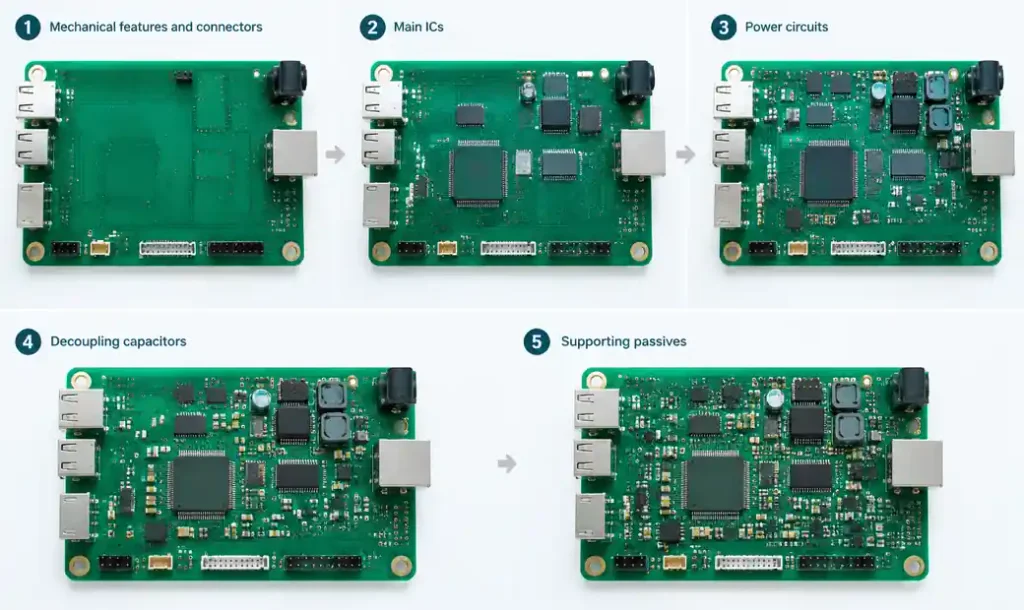
3. Power Components
Place voltage regulators and MOSFETs near board edges where airflow is strongest, away from temperature-sensitive parts.
4. Decoupling Capacitors
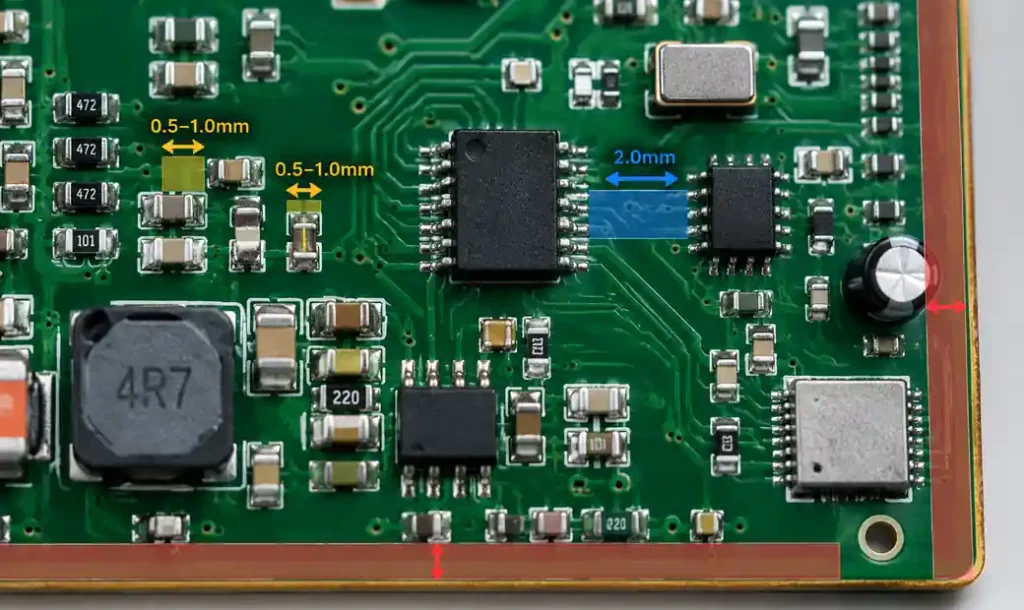
Position within 2-3mm of IC power pins—closer for designs above 1GHz. Learn more about HDI PCB design for high-density layouts.
5. Functional Blocks & Remaining Passives
Group related components, then fill remaining space with resistors and general capacitors.
Critical Spacing Rules for Automated Assembly
Component spacing directly impacts solder joint quality and assembly yield.
| Component Type | Minimum Spacing | Recommended Spacing | Purpose |
|---|---|---|---|
| 0402/0201 Passives | 0.2mm | 0.5mm | Prevent tombstoning |
| Standard SMT (0603+) | 0.5mm | 1.0mm | Nozzle clearance |
| BGAs and QFNs | 1.0mm | 2.0mm | Rework access |
| Through-Hole | 1.5mm | 2.5mm | Wave soldering |
| Component-to-Edge | 2.0mm | 3.0-5.0mm | Depanelization |
| High-Power Components | 3.0mm | 5.0mm+ | Thermal isolation |
For industrial and automotive applications, increase spacing by 50% to accommodate conformal coating and mechanical stress relief.
Thermal Management Through Strategic Placement
Heat-generating components create thermal gradients affecting nearby parts. Voltage regulators and power amplifiers reach 85-125°C, while temperature-sensitive components must stay below 70°C.
Thermal Zoning Strategy
- Hot Zone: Power circuits, motor drivers, high-current traces
- Moderate Zone: Digital logic, microcontrollers
- Cool Zone: Precision analog, timing circuits, sensors
Maintain 5mm separation between hot and cool zones. For power densities exceeding 2W/cm², increase to 10mm. Read more about thermal management techniques for heat-intensive designs.
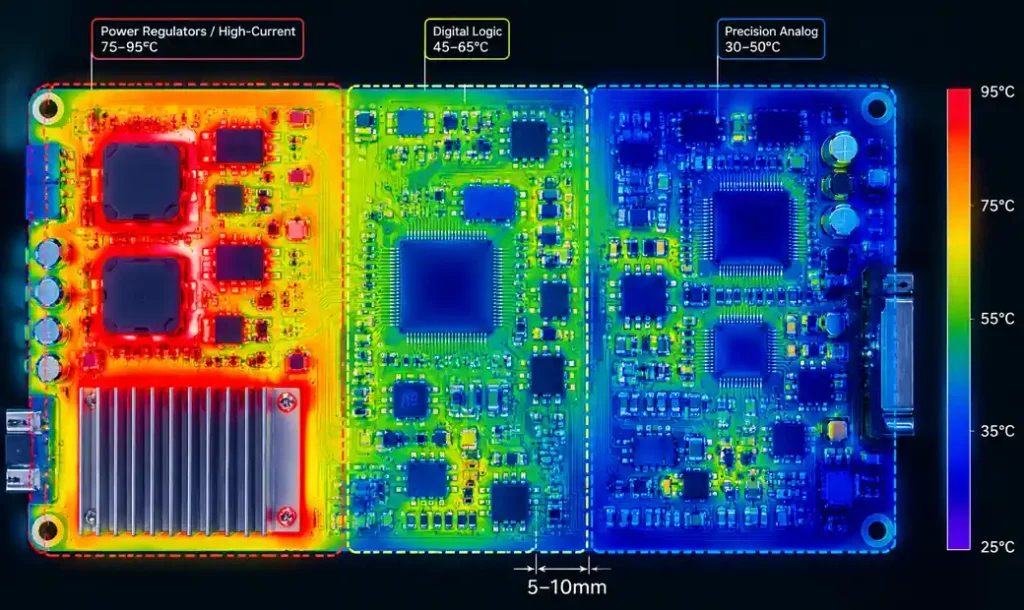
Position heat sources near board edges where convection is strongest. A voltage regulator dissipating 2.5W raises adjacent component temperature by 8-15°C within 5mm radius.
Component Orientation: Consistency Reduces Errors
Automated machines work fastest with consistent orientation. Every 90-degree rotation adds 0.2-0.4 seconds per component—cutting throughput by 20-25% across thousands of placements.
Align all polarized components (diodes, capacitors, ICs) in the same direction. Orient chip resistors and capacitors with their long axis perpendicular to board edges to reduce tombstoning during reflow.
Design for Testing: Test Point Placement Strategy
Test point accessibility determines whether you use flying probe (flexible, slower) or bed-of-nails fixtures (fast, precise grids).
Test Point Spacing Requirements
| Test Method | Minimum Spacing | Grid Pitch | Test Point Diameter |
|---|---|---|---|
| Flying Probe | 0.5mm | None | 0.4-0.8mm |
| Bed-of-Nails ICT | 1.27mm | 50/100 mil | 1.0-1.5mm |
| Boundary Scan | N/A | N/A | Standard connector |
Maintain 0.5mm clearance between test points and component edges. For production above 500 units, invest in bed-of-nails design—test time drops to under 30 seconds per board. Learn more about PCB testing methods.
Keepout Zones: Where Components Cannot Go
Standard Keepout Zones
- Board Edge: 2-3mm for standard manufacturing, 5mm for wave soldering
- Mounting Holes: 3mm radius for screw clearance and stress relief
- Connector Areas: 5-10mm for cable access
- Flex Bends (rigid-flex): 0.5mm per IPC-2223
- High-Voltage Traces: Per IPC-2221 spacing tables
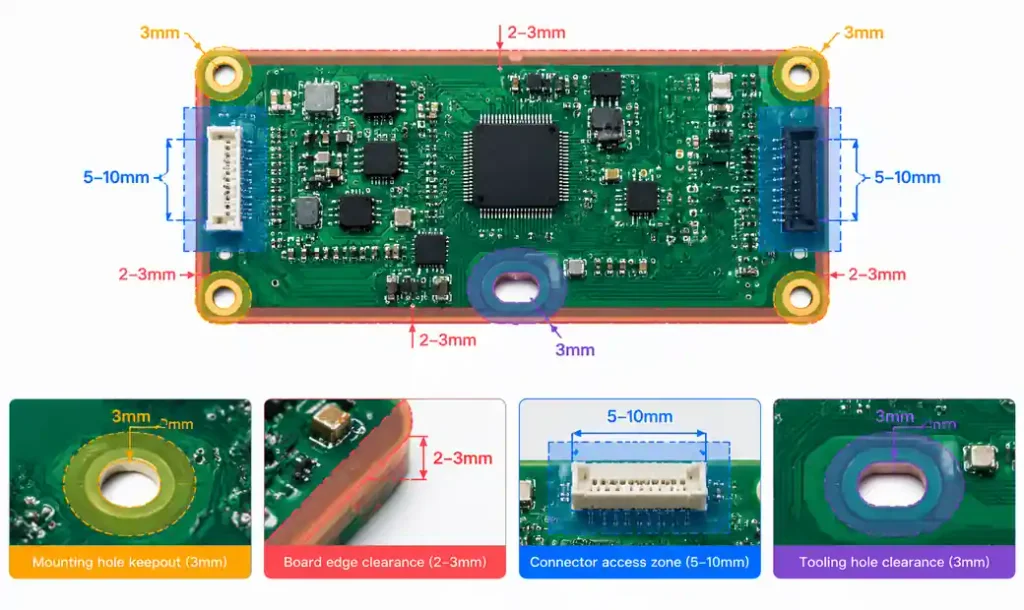
Components placed 1mm from mounting holes risk damage during screw tightening. Components within 2mm of board edges risk damage during depanelization.
Functional Block Placement for Signal Integrity
Group related components to minimize trace distance and reduce EMI. Place clock components (crystal, PLL) at the geometric center of their load network to equalize trace lengths. Learn more about PCB layer stackup design for signal integrity.
Separate analog and digital grounds, bridging at a single point. Position sensitive analog components 10mm away from digital circuits for 8-bit resolution, 15mm for 12-bit, 20mm for 16-bit+ converters.
Practical DFM Placement Checklist
□ All connectors accessible from board edges
□ Polarized components oriented consistently
□ Decoupling capacitors within 3mm of IC power pins
□ Test points on 50 or 100 mil grid (bed-of-nails)
□ 5mm clearance around adjustable components
□ High-power components near board edges
□ Temperature-sensitive parts isolated from heat
□ Reference designators visible (0.8-1.0mm text)
□ Fiducial marks in 3 corners
□ No components under SMT parts requiring bottom reflow
This checklist catches 80% of placement issues before manufacturing.
Common Placement Mistakes That Break First-Pass Yield
1. Decoupling Capacitors Too Far from ICs
A 0.1µF capacitor 8mm from an IC provides minimal decoupling. Move within 2mm.
2. Test Points Under Components
SMT components block probe access. Verify accessibility in 3D view.
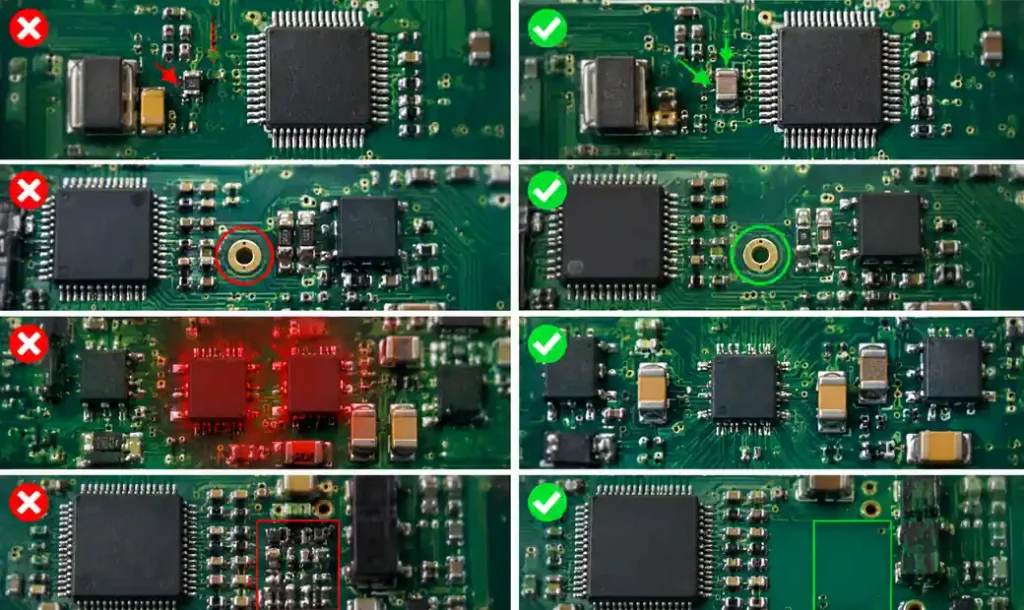
3. Thermal Clustering
Three regulators within 15mm create hot spots exceeding 105°C. Distribute heat sources.
4. Inadequate Rework Clearance
BGAs need 2-3mm clearance for rework nozzle access.
5. Connector Strain Relief
Place mounting holes within 5mm of large connectors to prevent solder joint fatigue.
Cost Reduction Through Optimized Placement
Strategic placement cuts manufacturing costs:
- Panel Utilization: Fit 2-4 boards per panel, reducing material waste 15-25%
- Single-Side Assembly: Eliminate second reflow, cutting cost 20-30%
- Consistent Orientation: Reduce setup time by 15-20 minutes
- Flying Probe Testing: Save $1,500-$5,000 fixture costs for low volumes
For runs below 500 units, optimized placement saves $2,500-$8,000 in fixture development.
Industry-Specific Placement Considerations
Automotive (AEC-Q100)
Increase spacing (1.5mm passives, 3mm ICs) for vibration resistance. Use underfill for BGAs. See automotive PCB requirements for detailed standards.
Medical (IPC-6012 Class 3)
Position barcodes on board edges for traceability. Ensure visibility after assembly. Review medical device PCB design standards for compliance requirements.
Industrial (−40°C to +85°C)
Increase edge spacing to 5mm for thermal expansion. Learn about industrial control PCB design for harsh environments.
Advanced Placement: HDI and Microvia Integration
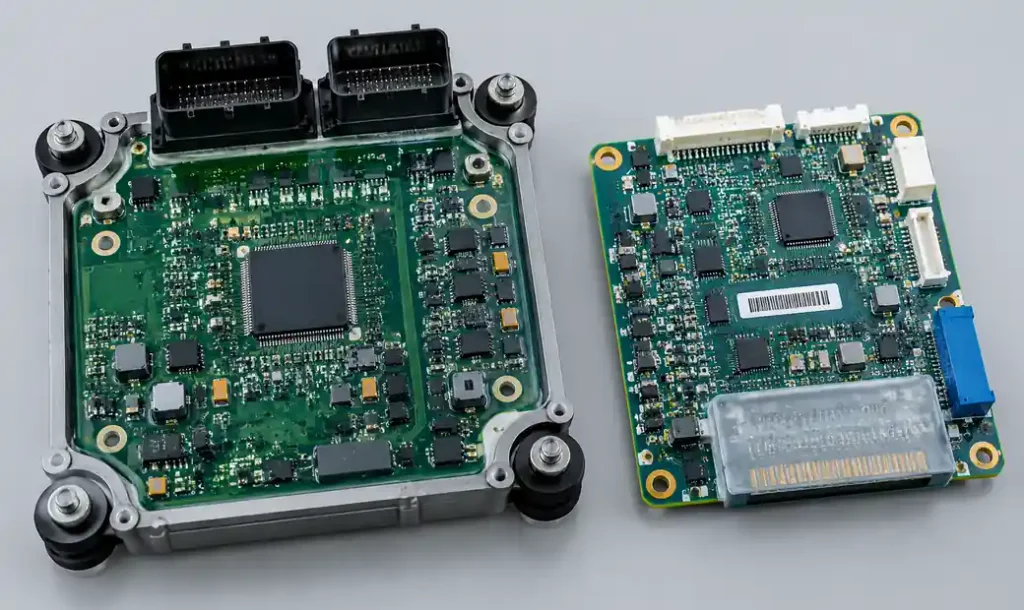
HDI enables tighter spacing through blind/buried vias. Place 0.4mm pitch BGAs with via-in-pad in board center where layer count is highest. Peripheral areas with fewer layers cannot support dense via fanout.
FAQ
Q: What is the minimum spacing between SMT components for automated assembly?
A: Standard SMT components (0603, 0805) require 0.5mm minimum, 1.0mm recommended. Smaller 0402 components can use 0.2mm spacing but increase tombstoning risk.
Q: How close should decoupling capacitors be to IC power pins?
A: Within 2-3mm for standard designs, under 2mm for high-speed above 1GHz. Effectiveness decreases exponentially with distance.
Q: What clearance is needed around mounting holes?
A: 3mm radius for M3 screws, 5mm for M4+. This covers screw head, washer clearance, and mechanical stress relief.
Q: Can I place components on both sides of the PCB?
A: Yes, but double-sided assembly increases cost 30-50%. Place all SMT on one side when possible. If required, put lighter components on bottom.
Q: What is the purpose of fiducial marks?
A: Optical references for pick-and-place vision systems. Place three in non-linear pattern with 3-5mm edge clearance. Use 1mm diameter bare copper circles.
Q: How much spacing between high-power and temperature-sensitive components?
A: 5mm minimum for components dissipating over 1W. Increase to 10mm for power densities above 2W/cm².
Q: What test point diameter for in-circuit testing?
A: Bed-of-nails ICT: 1.0-1.5mm diameter on 50 mil or 100 mil grid. Flying probe: 0.4-0.8mm, no grid required.
Conclusion
Component placement is the foundation of reliable PCB manufacturing. Strategic placement reduces assembly defects by 40% and cuts testing time by 30%.
Start with mechanical constraints and connectors, follow with critical ICs and power components, then add supporting circuitry. Maintain consistent orientation, respect thermal boundaries, and design test access from the beginning.
First-pass success depends on placement decisions made before routing begins. Lock placement only after thermal simulation, DFM review, and assembly validation. The investment in upfront planning returns 10:1 through faster time-to-market and lower costs.