Mastering Assembly Drawings: The Essential Guide to PCB Design Success
Key Takeaways
In the realm of PCB design, understanding the significance of assembly drawings is paramount. These visual documents serve as a vital communication tool that bridges the gap between design intent and manufacturing execution. By creating detailed pcb assembly drawings, designers ensure that every element is accounted for, minimizing errors during the production phase. Key components of effective assembly drawings include clear annotations, precise component placement, and comprehensive bill of materials which provide essential information for the manufacturing team. Employing best practices such as consistency in symbols and a logical layout can further enhance clarity in pcba processes. Moreover, fostering strong communication between designers and manufacturers is crucial; feedback during the initial stages can preemptively address potential ambiguities in assembly instructions. Also, being aware of common pitfalls—like failing to update drawings after revisions—can save time and reduce costs. To streamline the creation of these essential documents, utilizing advanced tools and software tailored for assembly drawing generation can significantly improve productivity. As we navigate through evolving technology and methodologies in PCB, adapting to future trends will not only elevate the quality of pcb assembly but also enhance overall project success rates.
Understanding the Importance of Assembly Drawings in PCB Design
Effective assembly drawings are a cornerstone of successful PCB design. They serve as critical communication tools that bridge the gap between design and manufacturing, ensuring that the intent of the design is conveyed with clarity and precision. High-quality pcba (printed circuit board assembly) documents include diagrams, annotations, and specifications that detail how components should be arranged and soldered.
The significance of these drawings extends beyond mere instruction; they are essential for minimizing errors during production. For instance, an assembly drawing that clearly labels each component can significantly reduce misunderstandings and misplacements on the manufacturing floor. Designers can also anticipate potential issues by incorporating detailed notes on assembly methods, which further streamline processes such as pcb assembly verification.
Moreover, these drawings enhance collaboration between designers and manufacturers, fostering a shared understanding of project goals. A survey indicated that enhanced communication through clear assembly documentation correlated with a 20% increase in production efficiency across various PCB projects.
To illustrate this point:
| Key Aspect | Impact on PCB Design |
|---|---|
| Clear Annotations | Reduces errors during assembly |
| Component Layout | Aids in verifying correct placements |
| Detailed Specifications | Facilitates faster manufacturing processes |
“A well-prepared assembly drawing can effectively communicate design intent while ensuring that every detail is addressed before production begins.”
In short, investing time and effort into creating effective pcb assembly drawings not only improves the quality of designs but also plays a pivotal role in achieving outstanding project outcomes. By prioritizing these crucial documents in your workflow, you elevate your chances for success in an increasingly competitive market.
Key Components of Effective Assembly Drawings
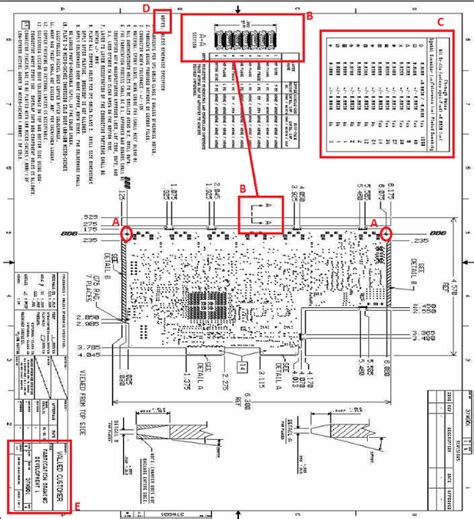
Effective assembly drawings play a critical role in the pcb assembly process, ensuring that every component is placed accurately and connected properly. Key components of these drawings include a comprehensive layout that delineates the printed circuit board assembly (PCBA) design, highlighting the specific locations for all components such as resistors, capacitors, integrated circuits, and connectors. Additionally, incorporating detailed annotations for each component is essential; these annotations should include part numbers, orientation, and any necessary notes regarding soldering techniques or special handling instructions.
The use of standardized symbols and terminology is crucial to enhance clarity and prevent misunderstandings during the manufacturing process. Furthermore, integrating a bill of materials (BOM) within your assembly drawings can provide a quick reference for materials needed, thus streamlining the sourcing process. Color coding also serves as an effective tool for distinguishing between different types of components or signals within the PCBA.
Ultimately, well-crafted assembly drawings not only facilitate clear communication between designers and manufacturers but also reduce errors during the production phase. By meticulously addressing these key components, designers can promote efficiency and accuracy across PCB projects, setting the foundation for successful outcomes in pcb assembly endeavors.
Best Practices for Creating Clear Assembly Instructions
Creating clear assembly instructions for PCB assembly is crucial to achieving successful outcomes in pcba projects. Start by utilizing a consistent format and standard symbols to enhance understanding and minimize errors. Ensure that your instructions include detailed descriptions of each component, including part numbers, orientations, and any necessary soldering techniques. Using annotated visuals can significantly improve comprehension; diagrams illustrating component placement alongside clear assembly drawings can bridge gaps between design intent and practical execution. Additionally, consider incorporating step-by-step guidelines that walk the assembler through the process methodically, addressing common challenges that may arise during assembly. It is essential to keep your language straightforward; avoid jargon where possible, and define specialized terms when they must be used. Engaging with your manufacturing team during the drafting phase can provide invaluable insights and feedback on areas of potential confusion. By prioritizing clarity in your assembly instructions, you not only facilitate smooth PCB assembly but also contribute to a more efficient production cycle, enabling high-quality outcomes that align with your design goals.
Enhancing Communication between Designers and Manufacturers
Effective communication between designers and manufacturers is crucial for the successful realization of PCB assembly projects. In the realm of pcba, assembly drawings serve as a vital bridge, ensuring that all parties are on the same page regarding specifications and expectations. By providing detailed graphical representations and accompanying notes, designers can help manufacturers understand the intricacies of the assembly process, minimizing misinterpretations that could lead to costly errors. It is essential for designers to clearly outline key components, such as component placement, orientation, and soldering requirements within these drawings. Additionally, incorporating standardized symbols and annotations can foster easier comprehension across diverse teams. Regular feedback loops between designers and manufacturers also contribute significantly to refining assembly instructions. By actively seeking input during the design phase, designers can anticipate potential challenges that may arise during manufacturing. This collaborative approach not only enhances the quality of PCB assembly outputs but also boosts overall production efficiency and timeliness in project delivery. Ultimately, prioritizing communication fosters a sense of partnership that can lead to innovation in pcba processes, paving the way for successful project outcomes.
Common Pitfalls in PCB Assembly Drawings and How to Avoid Them
Creating pcb assembly drawings is a meticulous process, and several common pitfalls can jeopardize the efficacy and clarity of these crucial documents. One frequent error is the lack of clarity in the labeling of components, which can lead to confusion during assembly. To avoid this, ensure that each component is clearly identified with unique designators that are consistent throughout the entire assembly drawing. Another pitfall arises from inadequate detailing. For instance, neglecting to include specific information about orientations or placements can result in misalignments during production. To mitigate this issue, always incorporate detailed notes and standards that guide manufacturers on how to interpret the drawings accurately.
In addition, relying solely on outdated software tools can hinder the quality of your pcba documentation. Utilizing modern design tools that offer 3D visualization, real-time collaboration features, and automated generation of assembly instructions is crucial for mitigating these risks. Furthermore, failing to have a coherent communication strategy between designers and manufacturers can lead to misunderstandings regarding the specifications of the printed circuit boards (PCBs). Establishing a feedback loop where designers can verify details with manufacturers before finalizing drawings will help ensure accuracy.
Lastly, overlooking extensive review processes can be detrimental; an assembly drawing marred with errors may result in costly production delays or faulty assemblies. Incorporating multiple levels of review – both internal and external – will enhance quality assurance for your pcba projects, fostering a culture that prioritizes precision in every step of the PCB design and assembly process. By being mindful of these pitfalls and actively implementing strategies to circumvent them, designers can significantly improve their assembly drawings, leading to better project outcomes overall.
Tools and Software for Efficient Assembly Drawing Creation
Creating precise assembly drawings is essential for the success of PCB assembly projects, and thankfully, various tools and software have emerged to enhance this process. Modern design software enables engineers to develop accurate and scalable diagrams that effectively relay the complexities involved in PCBA. Programs such as Altium Designer, Eagle, and KiCad not only facilitate the drafting of technical documents but also integrate features that allow for real-time collaboration between team members. These tools offer robust libraries filled with components which can significantly reduce the time spent on manual drawing while ensuring accuracy.
Moreover, tools like AutoCAD and SolidWorks can be leveraged for additional functionality, particularly when detailed mechanical design elements need to be incorporated into assembly instructions. Employing these software solutions not only aids in generating clear assembly outputs but also promotes better communication between designers and manufacturers, making it easier to address discrepancies before they escalate into costly mistakes. Investing in reliable software is crucial; it streamlines workflows and ultimately contributes to smoother production cycles while ensuring that each element of the PCB assembly process is meticulously documented. Embracing technology in drawing creation empowers designers by providing them with the resources necessary to achieve more effective outcomes in their projects.
Case Studies: Successful PCB Projects Driven by Quality Assembly Drawings
One of the most compelling aspects of pcb assembly is the transformative effect that quality assembly drawings can have on project outcomes. For instance, in a recent case study involving a consumer electronics startup, the integration of comprehensive assembly drawings directly impacted their PCBA process. The design team ensured that every component was meticulously documented, allowing for enhanced clarity during manufacturing. This resulted in a significant reduction in errors, with the initial production run achieving a remarkable 98% first-pass yield rate.
Another illustrative example comes from an established automotive manufacturer that sought to streamline its processes for complex pcb assembly tasks. By adopting standardized assembly drawings that highlighted critical components and connections, the manufacturer overcame communication barriers between the design and manufacturing teams. As a result, not only did they accelerate their timeline for new product introductions, but they also minimized costly rework due to misunderstandings about assembly instructions.
These success stories underline the importance of investing time and resources into creating precise and clear assembly drawings. The insights gained from these examples highlight how effective documentation can lead to improved collaboration, increased efficiency, and ultimately successful project completions in the realm of printed circuit boards. Through continued focus on quality in pcb assembly, designers can elevate their projects to new heights of success.
Future Trends in PCB Design and Assembly Documentation
As the landscape of technology continues to evolve, the future of PCB assembly and its related documentation is poised for significant advancements. One prominent trend is the integration of automation in the design-to-manufacturing process. Automation tools, such as design rule checkers and Gerber file generators, streamline the creation of high-quality pcba documents, minimizing human error and enhancing overall efficiency. Furthermore, with the rise of Internet of Things (IoT) devices, the demand for more complex PCBs is increasing. This complexity requires meticulous assembly drawings that cater to multi-layer boards and intricate circuitry.
Another trend worth noting is the movement toward more collaborative environments between designers and manufacturers. Technologies such as cloud-based platforms facilitate real-time updates and communication regarding assembly documentation, ensuring that both teams are on the same page throughout the design process. Moreover, as sustainability becomes a core value in electrical engineering, future PCB designs are expected to incorporate eco-friendly practices—using materials that are less harmful to the environment while still meeting pcba requirements.
Additionally, advancements in machine learning could revolutionize how assembly drawings are generated. Predictive algorithms might soon assist designers in creating optimized layouts based on previous successful projects, effectively shortening development cycles and addressing potential issues before they arise. Ultimately, staying ahead of these trends will be crucial for anyone invested in PCB assembly, providing opportunities for innovation that enhances production efficiency without compromising quality.
Conclusion
In navigating the complexities of PCB assembly, it becomes increasingly clear that the creation of effective assembly drawings is integral to success. These drawings serve as the backbone of communication between designers and manufacturers, providing the necessary clarity to translate concepts into tangible products. By adhering to best practices in the development of pcba specifications, designers can significantly reduce errors and enhance production efficiency. The incorporation of detailed visual aids not only facilitates better understanding but also minimizes misunderstandings that can arise during the assembly process. It is essential to continually evaluate and refine your approach, learning from both successes and setbacks in previous projects. As technology evolves, staying current with innovative tools designed for creating assembly drawings can provide a competitive edge. Ultimately, mastering this aspect of PCB design not only leads to improved workflows but also contributes to delivering high-quality products that meet or exceed industry standards. By celebrating the art and science behind precise assembly drawings, professionals in the field can transform their PCB project outcomes and drive success in future endeavors.
FAQs
When it comes to pcb assembly and the creation of printed circuit board assemblies (PCBA), there are several frequently asked questions that arise among both novice and experienced designers. One common question is about the importance of assembly drawings in the PCB design process. Assembly drawings serve as critical guides, ensuring that each component is accurately placed and aligned during manufacturing. Without clear assembly instructions, there’s a risk of misalignment or incorrect component placements, which can lead to costly mistakes and delays.
Another query often posed is related to common pitfalls that may occur during the creation of assembly drawings. Many designers may overlook the significance of detailed annotations or fail to provide adequate references for component placement, which can cause confusion later in the manufacturing process. It’s essential to include comprehensive notes and consider visual aids that enhance understanding.
Designers also frequently ask about tools and software best suited for generating high-quality assembly drawings. Various software options exist which are specifically designed for pcb assembly, enabling users to produce professional-grade documentation efficiently. Leveraging these tools can significantly improve both productivity and accuracy.
For anyone looking to enhance their knowledge further or streamline their pcba workflow, numerous resources are available that can provide additional insights into best practices and industry standards.