Pcb assembly software
Top Features To Look For In PCB Assembly Software
When selecting PCB assembly software, it is crucial to consider several key features that can significantly impact the efficiency and accuracy of your design and manufacturing processes.
One of the primary features to look for is an intuitive user interface.
A user-friendly interface ensures that both novice and experienced users can navigate the software with ease, reducing the learning curve and minimizing the potential for errors. Additionally, an intuitive interface often includes customizable toolbars and shortcuts, allowing users to tailor the software to their specific needs and preferences.
Another essential feature is comprehensive design rule checking (DRC).
DRC is vital for ensuring that your PCB design adheres to industry standards and manufacturing capabilities. Advanced DRC tools can automatically detect and highlight potential issues such as spacing violations, trace width problems, and component placement errors. By identifying these issues early in the design process, you can avoid costly revisions and delays during manufacturing.
Integration with other design tools is also a critical consideration.
PCB assembly software that seamlessly integrates with schematic capture tools, simulation software, and mechanical CAD programs can streamline your workflow and improve collaboration among team members. This integration allows for the easy transfer of data between different stages of the design process, reducing the risk of errors and ensuring that all team members are working with the most up-to-date information.
Furthermore, robust component libraries are indispensable for efficient PCB design.
A comprehensive component library should include a wide range of components from various manufacturers, complete with detailed specifications and footprints. Access to an extensive library can save time and effort by eliminating the need to create custom components from scratch. Additionally, some PCB assembly software offers cloud-based libraries that are regularly updated with new components, ensuring that you always have access to the latest parts.
Another feature to consider is advanced routing capabilities.
Efficient routing tools can significantly reduce the time required to complete a PCB design while ensuring optimal signal integrity and minimizing electromagnetic interference (EMI). Look for software that offers automatic and manual routing options, as well as features such as differential pair routing, length tuning, and via stitching. These advanced routing tools can help you achieve high-performance designs that meet stringent electrical requirements.
Moreover, 3D visualization and design capabilities are becoming increasingly important in PCB assembly software.
3D visualization allows you to view your PCB design from different angles, providing a more comprehensive understanding of component placement and potential mechanical conflicts. This feature can be particularly useful for identifying issues that may not be apparent in a 2D view, such as clearance problems between components and enclosures. Additionally, some software offers 3D design capabilities that enable you to create and edit mechanical parts directly within the PCB design environment, further streamlining the design process.
Lastly, consider the software’s support for design for manufacturability (DFM) and design for test (DFT) guidelines.
DFM and DFT tools can help you optimize your PCB design for efficient manufacturing and testing, reducing the likelihood of production issues and improving overall product quality. These tools can provide valuable insights into potential manufacturing challenges, such as solderability issues, component accessibility, and test point placement, allowing you to address these concerns early in the design process.
In conclusion, selecting the right PCB assembly software involves evaluating a range of features that can enhance your design and manufacturing processes. An intuitive user interface, comprehensive design rule checking, integration with other design tools, robust component libraries, advanced routing capabilities, 3D visualization, and support for DFM and DFT guidelines are all critical factors to consider. By carefully assessing these features, you can choose software that meets your specific needs and helps you achieve high-quality, reliable PCB designs.
How PCB Assembly Software Enhances Manufacturing Efficiency
Printed Circuit Board (PCB) assembly software has become an indispensable tool in the electronics manufacturing industry, significantly enhancing manufacturing efficiency. This software streamlines various stages of the PCB assembly process, from design and prototyping to production and quality control. By integrating multiple functionalities into a single platform, PCB assembly software facilitates seamless coordination among different departments, thereby reducing errors and improving overall productivity.
One of the primary ways PCB assembly software enhances manufacturing efficiency is through its advanced design capabilities.
Engineers can use the software to create detailed schematics and layouts, ensuring that all components are correctly placed and connected. The software often includes design rule checks (DRC) and electrical rule checks (ERC), which automatically identify potential issues before the manufacturing process begins. This preemptive identification of errors not only saves time but also reduces the cost associated with rework and material wastage.
Transitioning from design to prototyping, PCB assembly software offers simulation features that allow engineers to test the functionality of their designs in a virtual environment.
These simulations can predict how the PCB will perform under various conditions, enabling designers to make necessary adjustments before physical prototypes are created. Consequently, this reduces the number of iterations needed to achieve a functional prototype, thereby accelerating the development cycle.
In the production phase, PCB assembly software plays a crucial role in optimizing the manufacturing process.
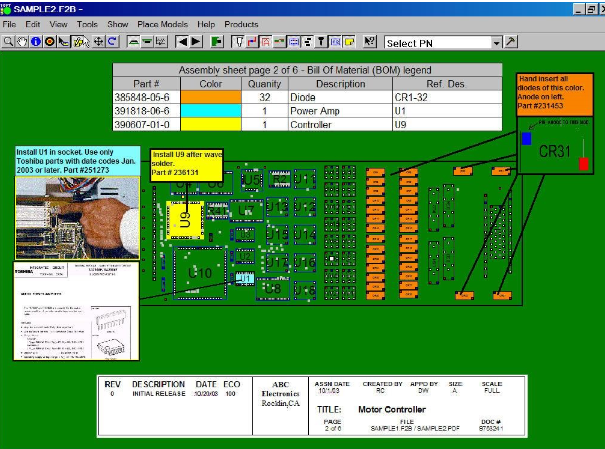
It provides detailed assembly instructions and machine programming data, which can be directly fed into automated assembly equipment. This automation minimizes human intervention, thereby reducing the likelihood of errors and increasing production speed. Additionally, the software can manage inventory by tracking component usage and availability, ensuring that the necessary parts are always in stock and reducing downtime due to material shortages.
Quality control is another area where PCB assembly software significantly contributes to manufacturing efficiency.
The software can integrate with inspection systems to automatically verify the accuracy of assembled PCBs. For instance, Automated Optical Inspection (AOI) and X-ray inspection systems can be programmed to compare the assembled boards against the original design files, identifying any discrepancies in real-time. This immediate feedback allows for quick corrective actions, ensuring that only high-quality products move forward in the production line.
Moreover, PCB assembly software often includes data analytics tools that provide valuable insights into the manufacturing process.
By analyzing production data, manufacturers can identify trends and pinpoint areas for improvement. For example, if a particular component consistently fails during assembly, the software can highlight this issue, prompting further investigation and corrective measures. This data-driven approach enables continuous improvement, leading to higher efficiency and better product quality over time.
In addition to these technical benefits, PCB assembly software also fosters better collaboration among team members.
Cloud-based platforms allow multiple users to access and work on the same project simultaneously, regardless of their physical location. This real-time collaboration ensures that everyone is on the same page, reducing misunderstandings and enhancing overall project coordination.
In conclusion, PCB assembly software is a powerful tool that enhances manufacturing efficiency through advanced design capabilities, simulation features, production optimization, quality control integration, data analytics, and improved collaboration. By leveraging these functionalities, manufacturers can streamline their processes, reduce errors, and produce high-quality PCBs more quickly and cost-effectively. As the electronics industry continues to evolve, the role of PCB assembly software in driving manufacturing efficiency will undoubtedly become even more critical.
Comparing Popular PCB Assembly Software: Pros And Cons
Printed Circuit Board (PCB) assembly software plays a crucial role in the design and manufacturing of electronic devices. As the demand for more complex and efficient electronic products grows, the need for robust PCB assembly software becomes increasingly important. In this article, we will compare some of the most popular PCB assembly software available today, examining their pros and cons to help you make an informed decision.
Altium Designer is one of the most widely used PCB assembly software in the industry.
It offers a comprehensive suite of tools that cater to both beginners and experienced professionals. One of the key advantages of Altium Designer is its user-friendly interface, which simplifies the design process. Additionally, it provides a high level of integration with other design tools, making it easier to manage complex projects. However, the software’s high cost can be a significant drawback for small businesses or individual users. Furthermore, its extensive feature set may be overwhelming for those who are new to PCB design.
Eagle, developed by Autodesk, is another popular choice among PCB designers.
It is known for its affordability and ease of use, making it an attractive option for hobbyists and small businesses. Eagle’s extensive library of components and its active user community are significant advantages, as they provide valuable resources and support. On the downside, Eagle’s user interface is often criticized for being less intuitive compared to other software. Additionally, its limited advanced features may not meet the needs of more experienced designers working on complex projects.
KiCad is an open-source PCB assembly software that has gained popularity due to its cost-effectiveness and flexibility.
Being open-source, it allows users to customize the software to suit their specific needs. KiCad’s active development community ensures that it is continuously updated with new features and improvements. However, the software’s learning curve can be steep for beginners, and its documentation may not be as comprehensive as that of commercial software. Despite these challenges, KiCad remains a strong contender for those seeking a free and versatile PCB design tool.
OrCAD, developed by Cadence, is another powerful PCB assembly software that is widely used in the industry.
It offers a range of advanced features, including simulation and analysis tools, which are essential for designing high-performance circuits. OrCAD’s robust design capabilities make it suitable for large-scale projects and professional use. However, its complexity and high cost can be prohibitive for smaller businesses or individual users. Additionally, the software’s steep learning curve may require significant time and effort to master.
DipTrace is a lesser-known but highly capable PCB assembly software that offers a balance between ease of use and advanced features.
Its intuitive interface and comprehensive component library make it accessible to both beginners and experienced designers. DipTrace also supports various file formats, ensuring compatibility with other design tools. However, its limited user community and less frequent updates compared to more popular software can be seen as disadvantages. Despite these drawbacks, DipTrace remains a viable option for those seeking a user-friendly and versatile PCB design tool.
In conclusion, the choice of PCB assembly software depends on various factors, including budget, project complexity, and user experience. Altium Designer and OrCAD are ideal for professional use and large-scale projects, while Eagle and DipTrace cater to hobbyists and small businesses. KiCad offers a cost-effective solution for those willing to invest time in learning and customization. By carefully considering the pros and cons of each software, you can select the one that best meets your specific needs and requirements.
Future Trends In PCB Assembly Software Development
The landscape of PCB assembly software is undergoing a significant transformation, driven by rapid technological advancements and evolving industry demands. As we look to the future, several trends are poised to shape the development of PCB assembly software, promising to enhance efficiency, accuracy, and overall productivity in the electronics manufacturing sector.
One of the most prominent trends is the integration of artificial intelligence (AI) and machine learning (ML) into PCB assembly software.
These technologies are set to revolutionize the way PCBs are designed and assembled by enabling predictive analytics, automated decision-making, and real-time optimization. AI algorithms can analyze vast amounts of data from previous assembly processes to identify patterns and predict potential issues, thereby reducing the likelihood of defects and improving yield rates. Moreover, machine learning models can continuously learn and adapt to new data, ensuring that the assembly process becomes more efficient over time.
In addition to AI and ML, the rise of the Internet of Things (IoT) is also influencing PCB assembly software development.
IoT devices generate a wealth of data that can be harnessed to improve the assembly process. For instance, IoT-enabled sensors can monitor various parameters such as temperature, humidity, and vibration during assembly, providing real-time feedback to the software. This data can be used to make immediate adjustments, ensuring optimal conditions for assembly and reducing the risk of component failure. Furthermore, IoT connectivity allows for seamless communication between different stages of the assembly process, facilitating better coordination and reducing downtime.
Another key trend is the increasing emphasis on digital twin technology.
A digital twin is a virtual replica of a physical product or process, and in the context of PCB assembly, it can be used to simulate and optimize the assembly process before actual production begins. By creating a digital twin of the PCB and its assembly line, manufacturers can identify potential bottlenecks, test different assembly strategies, and predict the performance of the final product. This not only accelerates the development cycle but also minimizes the risk of costly errors and rework.
Moreover, the shift towards Industry 4.0 is driving the adoption of advanced automation and robotics in PCB assembly.
Modern PCB assembly software is being designed to interface seamlessly with automated machinery, enabling precise control over the assembly process. Robotics can handle intricate tasks such as component placement and soldering with high precision, reducing the likelihood of human error and increasing throughput. As a result, manufacturers can achieve higher levels of consistency and quality in their products.
Furthermore, the growing complexity of PCBs, driven by the demand for smaller, more powerful electronic devices, is necessitating more sophisticated design and assembly tools.
PCB assembly software is evolving to support advanced design features such as multi-layer boards, high-density interconnects, and flexible circuits. These tools provide designers with greater flexibility and control, allowing them to create more intricate and compact designs without compromising on performance.
Lastly, the trend towards sustainability is also influencing PCB assembly software development.
As environmental concerns become more pressing, there is a growing focus on reducing waste and energy consumption in the assembly process. Modern software solutions are incorporating features that enable more efficient use of materials, optimize energy usage, and facilitate recycling and disposal of electronic waste. By adopting these sustainable practices, manufacturers can not only reduce their environmental footprint but also achieve cost savings and comply with regulatory requirements.
In conclusion, the future of PCB assembly software development is being shaped by a confluence of technological advancements and industry trends. The integration of AI and ML, the influence of IoT, the adoption of digital twin technology, the shift towards Industry 4.0, the need for advanced design capabilities, and the focus on sustainability are all driving the evolution of PCB assembly software. As these trends continue to unfold, they promise to bring about significant improvements in efficiency, accuracy, and overall productivity in the electronics manufacturing sector.