What are the skills for selecting components in PCB design?
1.Consider the choice of component package
Throughout the schematic drawing stage, you should consider the component package and land pattern decisions that need to be made in the layout stage. Here are some suggestions for considering when selecting components based on component packages.
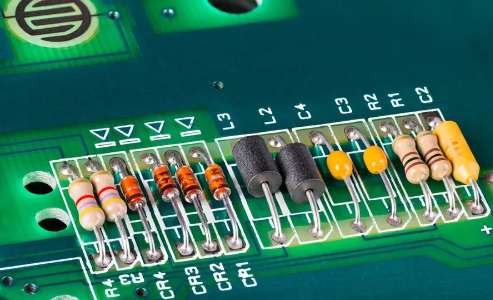
Remember that the package includes the electrical pad connections and mechanical dimensions (X, Y, and Z) of the component, that is, the shape of the component body and the pins that connect to the PCB. When selecting components, you need to consider any mounting or packaging restrictions that may exist on the top and bottom layers of the final PCB. Some components (such as polarized capacitors) may have height clearance restrictions that need to be considered during the component selection process. When you first start designing, you can draw a basic board outline shape and then place some large or position-critical components (such as connectors) that you plan to use. This will allow you to quickly and intuitively see a virtual perspective of the board (without wiring) and give a relatively accurate relative positioning of the board and components and component heights. This will help ensure that the components can be properly placed in the outer packaging (plastic products, chassis, frame, etc.) after the PCB is assembled. Invoke the 3D preview mode from the tool menu to browse the entire board.
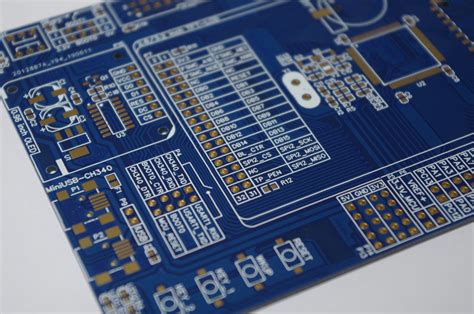
The land pattern shows the actual pad or via shape of the device on the PCB that is soldered to it. These copper patterns on the PCB also contain some basic shape information. The land pattern needs to be sized correctly to ensure proper soldering and to ensure the correct mechanical and thermal integrity of the connected components. When designing the PCB layout, you need to consider how the board will be manufactured, or how the pads will be soldered if hand soldering is performed. Reflow soldering (flux melting in a controlled high temperature oven) can handle a wide variety of surface mount devices (SMDs). Wave soldering is generally used to solder the reverse side of the board to fix through-hole devices, but can also handle some surface mount components placed on the back of the PCB. Usually when using this technique, the bottom surface mount device must be arranged in a specific direction, and the pads may need to be modified to accommodate this soldering method.
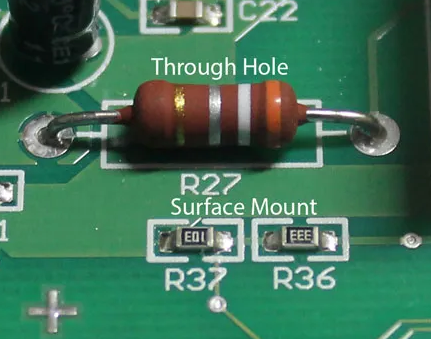
Component selection can change throughout the design process. Determining which components should use plated through holes (PTH) and which should use surface mount technology (SMT) early in the design process will help with the overall planning of the PCB. Factors to consider include component cost, availability, device area density, and power consumption. From a manufacturing perspective, surface mount devices are usually cheaper than through-hole devices and are generally more available. For small to medium-sized prototype projects, it is best to use larger surface mount devices or through-hole devices, which are not only convenient for hand soldering, but also facilitate better connection between pads and signals during troubleshooting and debugging.
If there is no ready-made package in the database, a custom package is usually created in the tool.
2.Use good grounding methods
Make sure the design has sufficient bypass capacitors and ground planes. When using integrated circuits, make sure to use appropriate decoupling capacitors close to the power supply terminal to the ground (preferably the ground plane). The appropriate capacitance of the capacitor depends on the specific application, capacitor technology, and operating frequency. When bypass capacitors are placed between the power and ground pins and close to the correct IC pins, the electromagnetic compatibility and susceptibility of the circuit can be optimized.
3.Assign virtual component packages
Print a bill of materials (BOM) to check virtual components. Virtual components have no associated packages and will not be transferred to the layout stage. Create a bill of materials and then view all virtual components in the design. The only entries should be power and ground signals, as they are considered virtual components and are only handled specifically in the schematic environment and are not transferred to the layout design. Unless used for simulation purposes, components shown in the virtual section should be replaced with components with packages.
4.Make sure you have complete bill of materials data
Check whether the bill of materials report has sufficient and complete data. After creating the bill of materials report, check carefully and complete the incomplete device, supplier or manufacturer information in all component entries.
5.Sort by component designator
To help sort and view the bill of materials, make sure the component designators are numbered consecutively.
6.Check for redundant gate circuits
Generally speaking, all redundant gate inputs should have signal connections to avoid floating input terminals. Make sure you check all redundant or missing gate circuits and that all unconnected input terminals are fully connected. In some cases, if the input terminals are floating, the entire system will not work correctly. Take the dual op amps that are often used in designs. If only one of the op amps in a dual op amp IC is used, it is recommended to either use the other op amp or ground the input of the unused op amp and lay out a suitable unity gain (or other gain) feedback network to ensure that the entire component can work properly.
In some cases, an IC with floating pins may not work properly within the specification range. Usually, the IC can only meet the specification requirements when the IC device or other gates in the same device are not working in a saturated state, and the input or output is close to or at the component power rail. Simulations usually cannot capture this situation because simulation models generally do not connect multiple parts of the IC together to model the floating connection effect.