
Troubleshooting PCB Circuits: A Comprehensive Guide
Printed Circuit Boards (PCBs) are the backbone of modern electronics, found in everything from smartphones to industrial machinery. However, even the most meticulously designed PCBs can encounter issues during manufacturing, assembly, or operation. Troubleshooting PCB circuits is a critical skill for engineers, technicians, and hobbyists alike. This article provides a comprehensive guide to identifying, diagnosing, and resolving common PCB problems.
1. Understanding the Basics of PCB Circuits
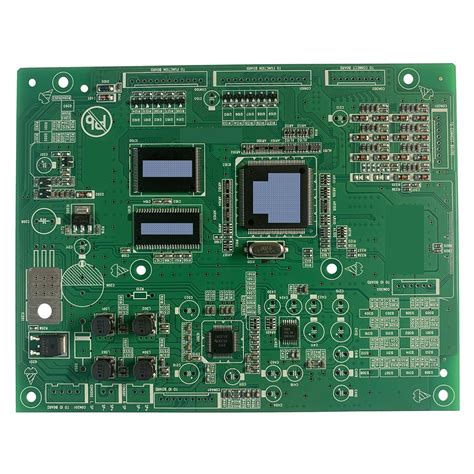
Before diving into troubleshooting, it’s essential to understand the fundamental components and structure of a PCB:
- Components: These include resistors, capacitors, diodes, transistors, integrated circuits (ICs), and connectors.
- Traces: Conductive pathways that connect components.
- Vias: Plated-through holes that connect traces on different layers.
- Pads: Areas where components are soldered to the board.
- Layers: PCBs can be single-sided, double-sided, or multi-layered.
Understanding these elements helps in identifying potential failure points during troubleshooting.
2. Common PCB Problems and Their Symptoms
2.1 Open Circuits
- Symptoms: No current flow, non-functional circuit.
- Causes: Broken traces, poor solder joints, or disconnected components.
- Diagnosis: Use a multimeter to check for continuity along the trace.
2.2 Short Circuits
- Symptoms: Excessive current flow, overheating, or component failure.
- Causes: Solder bridges, damaged insulation, or incorrect component placement.
- Diagnosis: Inspect the board visually and use a multimeter to check for low resistance between points that should not be connected.
2.3 Incorrect Component Values
- Symptoms: Circuit behaves unexpectedly or fails to meet specifications.
- Causes: Wrong components installed or components out of tolerance.
- Diagnosis: Verify component values using a multimeter or LCR meter.
2.4 Poor Soldering
- Symptoms: Intermittent connections, cold solder joints, or visible solder defects.
- Causes: Insufficient heat, improper soldering technique, or contaminated solder.
- Diagnosis: Inspect solder joints under magnification and reflow if necessary.
2.5 Thermal Issues
- Symptoms: Overheating components, thermal shutdown, or reduced lifespan.
- Causes: Inadequate heat dissipation, high current flow, or poor thermal design.
- Diagnosis: Use a thermal camera or thermometer to identify hot spots.
2.6 Signal Integrity Problems
- Symptoms: Noise, crosstalk, or signal distortion.
- Causes: Poor layout, inadequate grounding, or high-speed signal issues.
- Diagnosis: Use an oscilloscope to analyze signal quality.

3. Troubleshooting Tools and Equipment
Effective troubleshooting requires the right tools:
- Multimeter: Measures voltage, current, and resistance.
- Oscilloscope: Visualizes electrical signals.
- LCR Meter: Measures inductance, capacitance, and resistance.
- Thermal Camera: Identifies heat distribution.
- Magnifying Glass or Microscope: Inspects solder joints and traces.
- Soldering Iron: Repairs or replaces components.
- Desoldering Tools: Removes faulty components.
4. Step-by-Step Troubleshooting Process
4.1 Visual Inspection
- Objective: Identify obvious issues like broken traces, solder bridges, or damaged components.
- Procedure: Examine the board under good lighting and magnification. Look for discoloration, burn marks, or physical damage.
4.2 Power Supply Check
- Objective: Ensure the board is receiving the correct voltage.
- Procedure: Use a multimeter to measure voltage at the power supply pins. Compare with the expected values.
4.3 Continuity Testing
- Objective: Verify electrical connections.
- Procedure: Use a multimeter in continuity mode to check for open or short circuits. Test between points that should be connected and those that should not.
4.4 Component Testing
- Objective: Verify the functionality of individual components.
- Procedure: Use appropriate tools (multimeter, LCR meter) to test resistors, capacitors, diodes, transistors, and ICs. Replace any faulty components.
4.5 Signal Tracing
- Objective: Follow the signal path to identify where it deviates from expected behavior.
- Procedure: Use an oscilloscope to trace signals through the circuit. Compare with expected waveforms.
4.6 Thermal Analysis
- Objective: Identify overheating components.
- Procedure: Use a thermal camera or thermometer to measure component temperatures. Ensure they are within specified limits.
4.7 Firmware and Software Check
- Objective: Ensure the software is functioning correctly.
- Procedure: If the PCB includes a microcontroller or FPGA, verify the firmware or software. Reflash if necessary.
5. Advanced Troubleshooting Techniques
5.1 Boundary Scan Testing
- Objective: Test interconnections on complex PCBs.
- Procedure: Use boundary scan (JTAG) to test ICs and interconnects without physical access.
5.2 X-Ray Inspection
- Objective: Inspect internal layers and hidden solder joints.
- Procedure: Use X-ray imaging to detect issues like voids, cracks, or misaligned vias.
5.3 Environmental Testing
- Objective: Simulate operating conditions to identify intermittent issues.
- Procedure: Subject the PCB to temperature, humidity, and vibration tests.
6. Preventive Measures and Best Practices
6.1 Design for Manufacturability (DFM)
- Objective: Minimize manufacturing defects.
- Practices: Follow DFM guidelines, use appropriate trace widths, and ensure proper spacing.
6.2 Design for Testability (DFT)
- Objective: Facilitate easier testing and troubleshooting.
- Practices: Include test points, use modular design, and implement boundary scan.
6.3 Regular Maintenance
- Objective: Prevent long-term issues.
- Practices: Periodically inspect and clean PCBs, replace aging components, and update firmware.
6.4 Documentation
- Objective: Maintain a record of design changes and troubleshooting steps.
- Practices: Keep schematics, layout files, and test results up to date.
7. Case Studies
7.1 Case Study 1: Intermittent Connection
- Issue: A microcontroller-based PCB intermittently fails.
- Diagnosis: Visual inspection reveals a cracked solder joint on a crystal oscillator.
- Resolution: Reflow the solder joint and retest. The issue is resolved.
7.2 Case Study 2: Overheating Power Supply
- Issue: A power supply module overheats and shuts down.
- Diagnosis: Thermal imaging shows excessive heat on a voltage regulator.
- Resolution: Add a heat sink and improve ventilation. The regulator operates within safe limits.
7.3 Case Study 3: Signal Noise
- Issue: A high-speed communication link experiences data corruption.
- Diagnosis: Oscilloscope analysis reveals crosstalk between adjacent traces.
- Resolution: Redesign the PCB layout to increase trace spacing and add ground planes. The noise is eliminated.
8. Conclusion
Troubleshooting PCB circuits is both an art and a science, requiring a systematic approach, the right tools, and a deep understanding of electronic principles. By following the steps outlined in this guide, you can effectively identify and resolve common PCB issues, ensuring reliable and efficient operation of your electronic devices. Remember, preventive measures and best practices during the design and manufacturing phases can significantly reduce the likelihood of problems, saving time and resources in the long run.
Whether you’re a seasoned engineer or a novice hobbyist, mastering the art of PCB troubleshooting is an invaluable skill that will serve you well in the ever-evolving world of electronics.