
The Evolution and Importance of USB in Circuit Board Design
Introduction
Universal Serial Bus (USB) technology has revolutionized the way electronic devices communicate and transfer data. Since its introduction in the mid-1990s, USB has become a ubiquitous interface in circuit board design, enabling seamless connectivity between computers, peripherals, and embedded systems. This article explores the role of USB in printed circuit boards (PCBs), its various standards, design considerations, and future trends.
1. The Role of USB in Modern Circuit Boards
USB interfaces are integral to modern electronics, providing power and data transfer capabilities in a compact and standardized form. Key applications include:
- Data Transfer: USB allows high-speed communication between devices such as flash drives, external hard drives, and smartphones.
- Peripheral Connectivity: Keyboards, mice, printers, and cameras rely on USB for plug-and-play functionality.
- Power Delivery: USB Power Delivery (USB-PD) enables fast charging for laptops, tablets, and other devices.
- Embedded Systems: Microcontrollers and single-board computers (e.g., Arduino, Raspberry Pi) use USB for programming and communication.
2. USB Standards and Their Impact on PCB Design
Over the years, USB technology has evolved, with each new standard offering higher speeds and improved power delivery. The major USB versions include:
USB 1.x (1996)
- Speed: 1.5 Mbps (Low Speed) / 12 Mbps (Full Speed)
- PCB Considerations: Requires basic differential pair routing but is less sensitive to impedance mismatches.
USB 2.0 (2000)
- Speed: 480 Mbps (High Speed)
- PCB Considerations:
- Requires controlled impedance (90Ω differential).
- Trace length matching to minimize signal skew.
- Shielding to reduce electromagnetic interference (EMI).
USB 3.x (2008-2013)
- Speed: 5 Gbps (USB 3.0), 10 Gbps (USB 3.1), 20 Gbps (USB 3.2)
- PCB Considerations:
- More stringent impedance control (85-100Ω differential).
- Requires additional differential pairs (SuperSpeed lines).
- Careful via placement to minimize signal reflections.
USB4 (2019) & USB-C
- Speed: Up to 40 Gbps (with Thunderbolt 3 compatibility).
- PCB Considerations:
- Complex multilayer PCB designs with tight impedance tolerances.
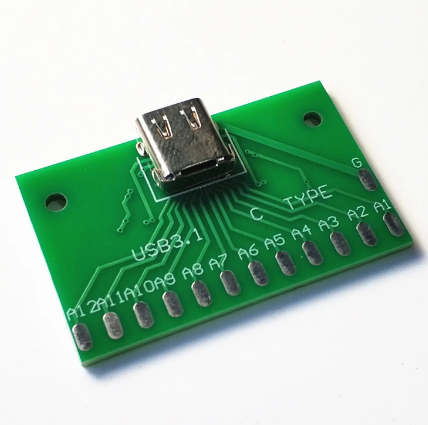
- USB-C connectors require symmetrical routing for reversible plug orientation.
- Active signal conditioning may be needed for long traces.
3. Key PCB Design Considerations for USB
Designing a circuit board with USB functionality requires attention to several critical factors:
A. Signal Integrity
- Impedance Matching: USB 2.0+ signals must maintain consistent impedance to prevent reflections.
- Differential Pair Routing: USB data lines (D+ and D-) should be routed closely together with minimal length mismatch.
- Minimizing Crosstalk: Keep USB traces away from high-speed digital or RF signals.
B. Power Delivery and Grounding
- Voltage Regulation: USB ports must provide stable 5V power, often requiring dedicated voltage regulators.
- Ground Plane Integrity: A solid ground plane reduces noise and improves signal quality.
C. EMI/EMC Compliance
- Shielding: USB cables and connectors should be shielded to prevent interference.
- Ferrite Beads: Used to suppress high-frequency noise on power lines.
D. USB Connector Selection
- Type-A/B/Micro/Mini: Traditional connectors with specific orientation requirements.
- USB-C: Reversible, supports higher power and data rates but requires careful PCB layout.
4. Common USB PCB Layout Mistakes and How to Avoid Them
- Improper Trace Length Matching: Causes signal skew and data errors.
- Solution: Use length tuning features in PCB design software.
- Insufficient Power Trace Width: Leads to voltage drops under high current.
- Solution: Follow IPC standards for trace width based on current requirements.
- Poor Grounding: Introduces noise and signal degradation.
- Solution: Use a continuous ground plane and avoid splits under USB traces.
5. Future Trends in USB and PCB Design
- Higher Speeds: USB4 v2.0 (80 Gbps) will demand advanced PCB materials (e.g., Rogers substrates).
- Integration with PCIe: USB4’s ability to tunnel PCIe signals will influence multilayer PCB designs.
- Wireless USB: Emerging technologies may reduce reliance on physical connectors.
Conclusion
USB technology remains a cornerstone of modern circuit board design, enabling high-speed data transfer and power delivery across countless devices. As USB standards continue to evolve, PCB designers must adapt to stricter signal integrity and power requirements. By following best practices in routing, grounding, and connector selection, engineers can ensure reliable USB performance in their designs.
The future of USB in PCBs promises even faster speeds, greater integration with other protocols, and innovative form factors, ensuring its relevance for years to come.